 CARIS HPD Publications Module
 CARIS HPD Publications Module
Menu | Edit > Sort |
Tool | |
Pop-up | Sort (Object Browser) |
Sort instructions or list items by attribute.
Related commands:
• • • • • | • • • • |
Interface
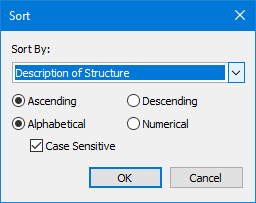
Option | Description |
|---|---|
Sort by | The attribute to sort by. Choose from a list of attributes associated with the instruction or record. |
Sort order | Choose from: • Ascending: Order from lowest to highest. • Descending: Order from highest to lowest. |
Sort type | • Alphabetical • Numerical • Case sensitive: For Alphabetical only. • On: The case of the text will be considered. • Off: Case will not be considered. |
Procedure
1. Select a notice that contains instructions or list records.
2. Select the Sort command.
The Sort dialog box is displayed.
3. Select an attribute from the Sort By list.
4. Select a sort order (Ascending or Descending).
5. Select a sort type. (Alphabetical or Numerical).
6. Click OK.
