 CARIS HPD Publications Module
 CARIS HPD Publications Module
Menu | Edit > Paste Special |
Tool |
|
Pop-up | Paste Special (Object Browser) |
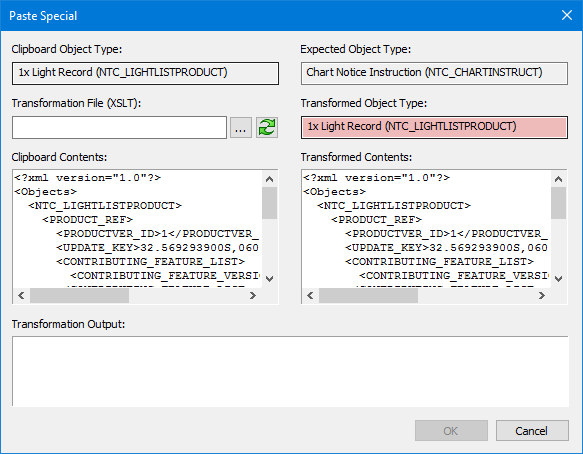
Paste Special applies an XSLT style sheet to material on the clipboard so it can be converted to the XML structure of the destination.
For example, this command can be used to copy details of a light record into a light notice instruction since the XML structure in Notices is different from Instructions.
Related commands:
• • • • | • • • • • |
Interface
Option | Description |
|---|---|
Clipboard Object Type | The object type of the clipboard contents. |
Expected Object Type | The object type after a transformation file is applied. |
Transformation File | An XSLT file which will be mapped to the destination. 1. Click browse ( 2. Click refresh ( |
Transformed Object Type | |
Clipboard Contents | Contains material copied from a publication section or a pending layer. |
Transformed Contents | Displays revised tags after a transformation file is applied. |
Transformation Output |
Procedure
1. Select a publication section or pending layer in the Object Browser.
2. Select the Copy command.
The material is copied to the clipboard.
3. Select the Paste Special for Publications command.
The Paste Special dialog box is displayed.
The Clipboard Contents section in the dialog box contains the copied material.
4. Click browse ( ) to select a transformation file.
5. Click refresh ( ) to view the material after the transformation file is applied.
The revised tags are displayed in the Transformed Contents box.
6. Select another layer in the Object Browser (for example, a notice).
7. Click OK.
The copied material is pasted to the selected layer.
