 Catalogue Editor
 Catalogue Editor
Menu | Edit > Add-Remove Attribute |
Tool |
|
Assign attributes that are in a database or XML dictionary to a profile.
Attributes that are in a profile can be removed.
A database or XML catalogue must be open to apply this command.
Related commands:
• • • • • • | • • • • • • |
Procedure
1. Select the Add-Remove Attribute command.
The Profile Attributes list is displayed.
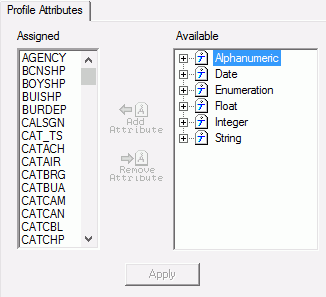
The Assigned list shows attributes already assigned to profile. The Available list shows attributes that have not yet been assigned.
2. Add or remove any necessary attributes. See table.
Command | Description |
|---|---|
Add Attribute
| Add an attribute: 1. Expand the Available list until you find the attribute that you want to add. 2. Select the attribute. 3. Click Add Attribute. The attribute is moved from the Available list to the Assigned list. |
Remove Attributes
| Remove an attribute. A removed attribute is still available in the dictionary. 1. Select the attribute you want to remove in the Assigned list. 2. Click Remove Attribute. The attribute is moved from the Assigned list to the Available list. |
3. Click Apply.


