Mapping converts features and attributes from one data format to another. You can also use mapping to convert between features and attributes of the same format.
Custom mapping files can be created and saved in the RuleFiles folder. The custom files must use the same structure and syntax as the mapping files included with the application.
See the Support Files section for a detailed description of mapping files and filtering operations. |
Compose module mapping files are located in ...\CARIS\<application>\<version>\modules\Compose\support\Rules.
Mapping File | Format Mapping |
|---|---|
aml10toaml21.xml | S‑57 AML data to S‑57 AML data |
S-57_3_1_to_S-101_draft | S-57 ENC to S-101 ENC |
Feature Editing mapping files are located in ...\CARIS\<application>\<version>\modules\support\<module>\Rules.
Mapping File | Format Mapping |
|---|---|
DGNRuleFile.xml | DGN to S‑57 3.1 |
GMLToENC3_1.xml | Geographic Markup Language (GML) to ENC 3.1 |
ih_f2o.xml | CARIS data to S‑57 ENC data |
Mapping files that can be used as examples for creating custom files are located in Feature Editing\support\Rules\Examples:
• Features_From_Edges_Mapping_Examples.xml
• Geometry_Mapping_Examples.xml
• Wildcard_Mapping_Examples.xml
The following commands use mapping:
• Import Selected Objects
• Change Selection
• Export to HOB
• Export to GML
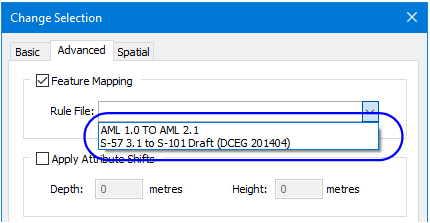
The mapping options for these commands are selected from lists such as this one in the Change Selection dialog box.