Menu | Import > Variable Resolution BAG |
Create a CSAR file in variable-resolution format from an input variable-resolution surface.
Currently the input is a BAG raster with variable-resolution refinement grids. BAG 1.6.0 was the first version to introduce support for variable-resolution refinement grids.
Related commands:
Export Variable Resolution to BAG
New Variable Resolution Surface .
Interface
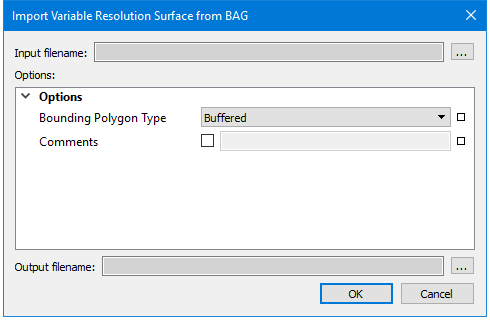
The Import Variable Resolution BAG command uses the following dialog box:
Option | Description |
|---|---|
Input filename | Select the BAG file variable resolution surface to import. |
Bounding Polygon Type | Specify the type of bounding polygon to generate. 1. Select either Buffered or Convex. Default setting is Buffered. |
Comments | Enable the check box to enter comments in the field, and type any necessary text. |
Output filename | Specify the name of the output variable resolution surface or point cloud in CSAR format. |
Procedure
1. Select the Import Variable Resolution BAG command.
The Import Variable Resolution Surface from BAG dialog box is displayed:
2. Click Browse (...) and select a variable resolution BAG surface.
3. Set Options.
4. Click Browse (...) and set the name of the output CSAR file.
5. Click OK.
A new variable resolution surface is created from the BAG data.