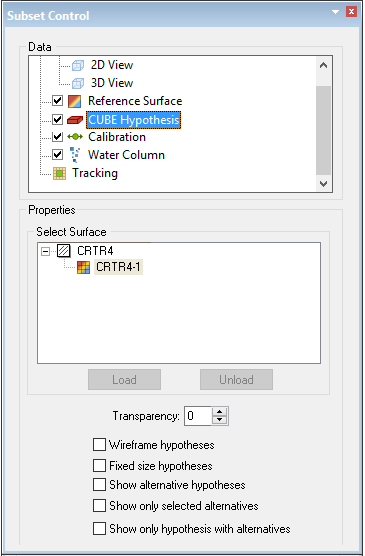
Properties for a CUBE hypothesis layer for the data contained within the subset bounding box.
This layer is loaded in the 3D Subset view.
The hypothesis editing options for the selected surface are listed at the bottom of the Subset Control window.
Properties | Description |
|---|---|
Transparency | Set a level of transparency for the surface using the up and down arrow buttons. |
Wireframe Hypotheses | Select the check box to display the hypothesis squares in the 3-D View without any fill. See Wire frame Hypotheses, |
Fixed Size Hypotheses | Select the check box to display the squares as flattened and in a standard size. See illustration on Fixed Size Hypotheses |
Nominate Alternative Hypotheses | Select the check box to display hypotheses that were not selected during disambiguation as well as those nominated so that you can select an alternative. See illustration Alternative Hypotheses |
Show only Selected Alternatives | Select the check box to show only the nominated and established hypotheses in the 2D and 3D Views. |
Show Only Hypotheses with Alternatives | Select the check box to view only those hypotheses selected by CUBE that do have alternative hypotheses. |
See also Hypothesis Editing.