Menu | Create (Add)> Layer By> Unique Feature Acronyms |
Tool |
|
Pop-up | Add Layer(s) > Unique Feature Acronym (Layers window) |
Menu | Create (Add)> Layer By> Unique Feature Acronyms |
Tool |
|
Pop-up | Add Layer(s) > Unique Feature Acronym (Layers window) |
Create a layer for every feature acronym in the selected layer.
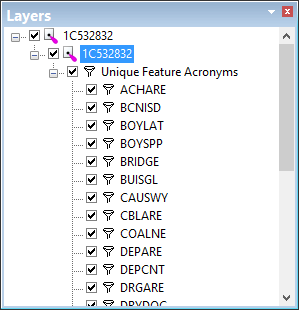
A layer called Unique Feature Acronyms is created. This contains a layer for each feature acronym in the original layer. Each layer is named according to the acronym it contains.
Related commands:
• Create Layer By Attribute Value
• Create Layer by Feature Acronym
• Create Layer by Feature Object ID
• Create Layer by Feature Type
Procedure
1. Select a layer.
2. Select the Create Layer by Unique Feature Acronyms command.
