Menu | Tools > Layers > Identify Holidays |
Pop-up | surface > Identify Holidays (Layers window) |
The Identify Holidays tool analyzes raster surfaces to classify each pixel node as no data, data or a hole. This classification allows you to determine which areas are holes in the surface, which areas contain data and which areas are outside of the surface area. This information can be used to interpolate the holes in the surface, or to select the superseding surface during a combine.
A numerical value is assigned to each node to represent its classification. The possible classification values are:
• 0: assigned to exterior, non-data values. This includes any area within the extents of the surface, but beyond the actual data of the surface.
• 1: assigned to valid data values.
• 2 and up: assigned to holes. Each hole is uniquely labelled, starting with 2 and incrementing by one for each hole until the maximum is reached for the 32bit Integer data type.
The classification information is added to the surface as a new band. All holiday layers are named according to the layer that was classified and appended with the word “Holidays”. For example, if the Depth layer of a surface were selected, the resulting layer would be called “Depth and Holidays”. This band can be removed from the surface, if needed, using the Remove Layer command. See Remove Layer for more information.
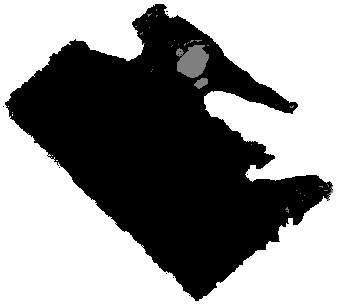
A “Holidays” colour range file is available for displaying holiday band data, if desired. This file will colour data nodes black, exterior no-data nodes white and holes grey. Below is an example of a surface with classification, with the exterior data populated.
Interface
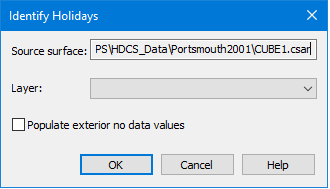
The Identify Holidays command uses the following dialog box.
Option | Description |
Source surface | The name and location of the surface selected in the Layers window at the time the tool was initiated. This field is for information purposes only and cannot be changed. |
Layer | The layer of the source surface that will have classifications added for the data. If a surface layer was selected in the Layers window when the tool was initiated, it is automatically selected. This can be changed if desired. |
Populate exterior no data values | The Populate exterior no data values option allows you to classify the area outside of the surface data but within the extents of the surface. By default, classifications are only assigned to holes and valid surface data. |
Procedure
1. Select the surface in the Layers window for which you want to identify holidays.
2. Select the Identify Holidays command.
3. Select a source layer from the Layer drop-down list.
4. [Optional] Click the check box to enable the Populate exterior no data values option.
5. Click OK.
The data in the selected layer is classified and a Holidays band is added to the surface.