In the following example, the box size is set to five data points. A FFT value or mean for any data point is calculated from itself and ‘the two data points on either side of it (if available).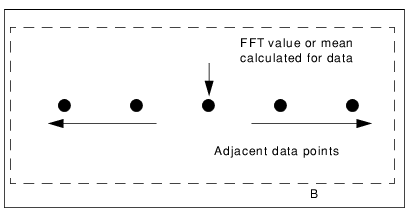
Use the Data options to reject data with residual values that fall outside threshold limits, and apply these changes to attitude data across the entire track line, using the Filter and Smooth options.
The Filter function is used to reject attitude that falls outside of defined boundaries. Soundings with the same time stamp as the rejected data are also flagged as rejected during merge. You can choose to use interpolation when rejecting data.
The Smooth function is used to smooth out localized variability. Any sensor data that can be viewed in the Attitude Editor can be smoothed. The Smooth option activates all the options except Reject with interpolation.
Moving Average and Fast Fourier Transform
There are two methods available for smoothing: Moving Average and Fast Fourier transform.
• The Moving Average function calculates an average sensor value over a window of data using the Box Size parameter. The window is defined as a number of data points or seconds centred on a point. The average value for all of the values in the window is calculated and will be given to the central point.
• The Fast Fourier option performs a low-pass filter on the selected sensor. You select a Box Size in either points or seconds. This value is converted into seconds and then inverted to become the cut-off frequency. Increasing the Box Size results in greater smoothing.
Box size
The Box Size determines how many neighbouring data points are used in the smoothing calculation. The number of neighbouring data points can determined using time or a set number of points.
The Moving Average and the Fast Fourier algorithm use the Box Size parameter in different ways.
• The Moving Average function uses the Box Size to determine the window that is used to calculate the average for the new “smoothed” centre point.
• The FFT algorithm uses the Box Size to define the cut-off frequency that is then applied to all data.
In the following example, the box size is set to five data points. A FFT value or mean for any data point is calculated from itself and ‘the two data points on either side of it (if available).
To apply filtering and smoothing:
1. Select a data type from the Data list or click inside a sensor window.
2. Select the Filter check box to activate the Reject with interpolation option.
3. Select the Smooth check box.
4. Select either the Moving Average or Fast Fourier smoothing options. Moving Average and Fast Fourier Transform
5. Select either the Points or Seconds check boxes.
6. Click the Box Size up or down arrow buttons to select the number of adjacent data points or a time range.
7. Set a Threshold value in a multiple of standard deviation (sigma).
(These options can also be applied from the Attitude filter. See Apply Attitude Filters)
When you close the Attitude Editor, you are prompted to save any changes. The parameters for creating the smoothed data are saved to the SmoothedCoefficients file in the HCDS_Data\Project\Vessel\Day\Line folder. The file is in XML format. This file is applied to the track line during processing, e.g., merge, SVP Correction and Compute Towfish Navigation.