Menu | File > ASCII Info File Editor |
Tool |
|
Menu | File > ASCII Info File Editor |
Tool |
|
New format information files can be created in the ASCII Info File Editor. See ASCII Info File Editor.
Two sample format information files are located in C:\Program Files\CARIS\HIPS\<version>\Template.
For the structure of an info file, see INFO file under HIPS and SIPS Support Files.
Related Commands:
Edit a Format Information File
Procedure:
To create a new format information file in the Editor:
1. Open the ASCII Info File Editor.
In the ASCII Info File Editor:
2. Click the New format information file button. 
The New ASCII Info File dialog box is displayed.
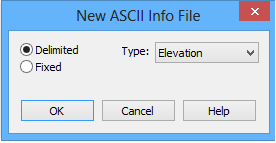
3. Select either Delimited or Fixed as the format for the file.
4. Select the Type of file from the list.
5. Click OK.
The File items control will be populated with the default column entries for the selected file type.
• For an elevation file, this includes X, Y and Z. These columns cannot be removed or renamed.
• For a navigation file, this includes X, Y and six DatagramTime entries. The X and Y columns cannot be removed or renamed.
The DatagramTime columns can be removed and/or renamed, as long as one time entry is left unchanged.
6. Define the properties of each column as needed. See
7. [Optional] Use the Remove button  to remove a selected column from the display.
8. [Optional] Add additional columns and attributes.
9. Click OK to name and save the new file.
