Tool | Command |
| Open Project |
| Open File |
| Open Connection |
| Close Project |
| |
| |
| |
| |
| Overview |
| Refresh |
| Zoom In |
| Zoom Out |
| Zoom Mode: Zoom Area |
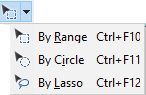
| Select Mode: Select by Range |
Select by Circle | |
Select by Lasso | |
| Pan Mode |
| 3D View |
| Controller Type: Navigate the 3D View |
If a toolbar is not visible, you can display it using the Show Toolbars command.
Menu | View > Toolbars > (individual toolbars) |
Standard
Tool | Command |
| Open Project |
| Open File |
| Open Connection |
| Close Project |
| |
| |
| |
| |
| Overview |
| Refresh |
| Zoom In |
| Zoom Out |
| Zoom Mode: Zoom Area |
| Select Mode: Select by Range |
Select by Circle | |
Select by Lasso | |
| Pan Mode |
| 3D View |
| Controller Type: Navigate the 3D View |
Editing Toolbar
Tool | Command |
|
|
|
| ||
|
| ||
|
| ||
|
| ||
|
| ||
|
| ||
|
| ||
|
| ||
|
| ||
| Set As Snap/Grab Target |
| |
|
| ||
|
| ||
|
| ||
|
|
* Some commands may not be available with all modules.