Menu | File > Export > Selection > Shapefile |
Export a selection of features to the Shapefile format. For each feature object type found in the selection, the following set of files is created:
• .dbf:
• .shp: This file contains the actual feature objects that were exported.
• .prj: This is a well-known text (WKT) format file containing the geographic coordinate system of the geometric data in the .shp file. Applications being used to open the resulting shapefile will reference this file.
• .shx:
Related commands:
Interface
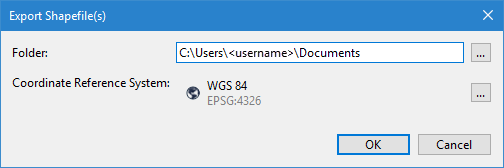
These Export Selection commands use the following dialog box.
Option | Description |
File | The name and location for the resulting shapefile. 1. Click the browse (...) button. 2. Define a name and location for the file. 3. Click Save. |
Coordinate Reference System | The coordinate reference system (CRS) to apply to the data during export. 1. Click the browse (...) button to launch the Select Coordinate Reference System tool. See Change Coordinate Reference System for information on this tool. 2. Select a CRS. 3. Click OK. |
Procedure
1. Select the input source in the Layers window.
2. Select the features in the Display window to be exported.
3. Select the Export Selection to Shapefile command.
The Export Shapefile(s) dialog box is displayed.
4. Define a name and location for the output file.
5. Select a CRS for the output.
6. Click OK.
The selected features are exported to a new Shapefile in the user-specified location.