Menu | Tools > Editors > Single Beam > Change Depths |
Pop-up | Change Depths (in Single Beam View window |
The Single Beam Editor enables you modify the digital depths created by the echo sounder's digitizer. Sometimes when fish or other obstructions in the water column trigger the digitizer, the sea bottom may still be visibly detectable on the analog sounding graph. This function enables you set the echo sounder’s depth values to the analog sounding depth values.
Related commands:
Interface
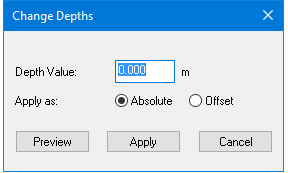
Depths are changed using this dialog box:
Procedure
To change depths of soundings along a selected line that is open in Single Beam Editor:
1. Set the Selected check box in the Data fields of the Single Beam Editor General tab.
2. Select a sounding(s) in the Single Beam View window.
3. Select the Change Depths command.
To move the sounding to a specific depth, for example, from 20m to 25m:
1. Select the Absolute option.
2. Type the new depth in the Depth Value field.
3. Click Preview to view the sounding at the new level.
4. Click Apply to set the sounding at the new depth and close the dialog box.
You can move a sounding by a specific amount (or offset from its current depth) to a deeper depth level, by applying a positive value (for example, 5.5). To move the sounding to a shallower depth level, use a negative value (for example, -5.5).
To move the sounding by a set amount:
1. Type the amount by which to move the sounding.
2. Select the Offset option.
3. Click Preview to view the sounding at the new level.
4. Click Apply to set the sounding at the new depth and close the dialog box.
You can also change depth values directly in the editor. However, this option omits the preview function of the dialog box.
1. Select soundings.
2. Position your cursor over the selected data. The cursor becomes a two-headed arrow with a Z symbol beside it.
3. Click and drag the cursor either up or down. The sounding depths are visible as you move the cursor.
4. Release the mouse button when the soundings are at the new depth.
To cancel the effect of moving these soundings to the new depths, select Undo from the Edit menu.