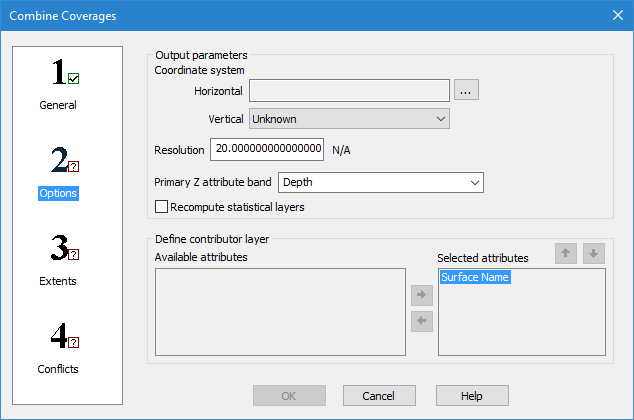
In step 2: Options of the Combine Coverages wizard you define a coordinate system, resolution, primary Z attribute band and contributing attributes for the output surface.
Interface
The following is the second step of the Combine Coverages wizard.
Option | Description |
Coordinate system: Horizontal | The horizontal coordinate reference system (CRS) for the resulting coverage. 1. Click the browse button (...) to launch the Select Coordinate Reference System dialog box and select a CRS. |
Coordinate system: Vertical | The vertical CRS for the resulting coverage. The vertical component is added to the metadata of the coverage, but does not apply any vertical transformations. |
Resolution | The Resolution value sets the node spacing of the generated output coverage. This value is populated using the input coverage with the greatest resolution value. The unit of measure for the resolution is determined by the horizontal coordinate system selected for output: • Ground units (metres, feet, etc.) are used for a projection. • Decimal degree units are used for a geographic coordinate system. |
Primary Z attribute band | The name of the primary Z attribute band (Depth, Height, etc.) in the resulting coverage. This can be defined to reflect the nature of the data. You can either select an option from the drop-down list, or manually type in a name. The options in the list are populated based on the elevation bands present in the selected input coverages. The Depth band is selected by default. If defining the name manually, only the following types of characters are supported: • Latin characters • numeric values • hyphens • underscores • spaces (although not at the beginning or end of the name) An error message will be displayed when you click OK if any other character types are present. |
Recompute statistical layers | This option allows default statistical layers to be recomputed during combine using specific values on a layer selected during conflict resolution. These layers include: • Deep: Recomputed using the deepest value on the layer. • Mean: Recomputed using the mean of the values on the layer. • Shoal: Recomputed using the shoalest value on the layer. • Density: Recomputed using the sum of all the density values on the layer that fall within the grid cell area. • Standard Deviation (Std_Dev): Recomputed using the Pooled Variance principle. The Mean and Density layers must be present in the coverage in order for this layer to be recomputed. |
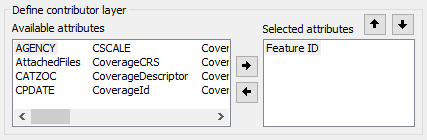
Define contributor layer | The attributes that will be included in the Contributor layer if combining database coverages. This layer provides data to identify the source of the nodes selected during conflict resolution. This set of options is disabled if combining local coverages. 1. Use the arrow buttons to change the attributes included in the Contributor layer of the combined coverage. All attributes in the Selected attributes list will be included. • Select an attribute in either the Available attributes or Selected attributes list and click the Left or Right arrow button to move the attribute from one list to the other. • Select an attribute in the Selected attributes list and click the Up or Down arrow button to change the order in which the values are listed. |
Procedure
1. For the Horizontal field, click the browse button (...) to launch the Select Coordinate Reference System dialog box and select a CRS.
2. Enter a Resolution value for the combined coverage.
3. In the Primary Z attribute band field, select an option from the drop-down list or type a name in the field.
4. If combining database coverages, select the attributes to be included in the Contributor layer of the combined coverage.
5. Define any other necessary options.
6. Select step 3 on the left and continue to Combine Coverages: Step 3 Extents.