When a change is made to a default setting, the change is highlighted in the dialog box. See below.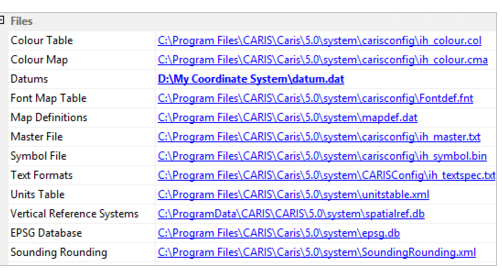
In the past, settings in Teledyne CARIS applications were stored in the Windows Registry Editor as environment variables. Settings could only be customized by accessing Registry Editor.
CARIS and its associated modules now use an environment that is independent of the Registry Editor. All file and folder paths and other settings are managed from a interconnected set of environment.xml files. The following table describes the different types of environment files.
File | Description |
System Environment File | This file contains settings that are used by CARIS and all modules in CARIS. The file is located in
Do not modify this file as it is required for application updates or fixes. The file is always overwritten when a more up-to-date version of CARIS is installed. |
Module Environment File | This file contains settings that are relevant to a specific module. Each module has its own
Do not modify this file as it required for module updates or fixes. The file always overwritten when a more up-to-date version of a module is installed. |
Custom Environment File | This file stores customized system or module settings. The file overrides the System Environment File or the Module Environment File. The file is located in
No custom environment file is installed by default. This file is optional and can be a copy System or User-Specific file. |
User Specific Environment File | This file stores custom settings for a single user. Changes in the Options dialog box are applied to this file. The file overrides the System Environment File, Module Environment File or the Custom Environment File. The file is located in
This file can be modified through the Options dialog box (see Setting up a CARIS Environment. |
Setting up a CARIS Environment
Custom files and modified settings can be applied to CARIS and its associated modules through the Options dialog box. The change is then written to User-Specific environment.xml file at the user level. Changes made in the can also, if needed, be copied to the Custom environment.xml file so changes can be applied to the computer.
When a change is made to a default setting, the change is highlighted in the dialog box. See below.
In the above example, the datum file has been changed from the default one in the CARIS System directory to a custom file in another location.
When CARIS is closed and reopened, the change is recorded to the User-Specific environment.xml file.
<Datums>D:\My Coordinate System\datum.dat</Datums> |
Custom files and settings for modules are also recorded in the User-Specific environment.xml file. For example, the htftypes.xml file that is contained in the BASE Editor module is set a different folder than the default.
<uslXHTFLookup>D:\My Custom Files\htftypes.xml</uslXHTFLookup> |
Both the above settings override the System and Module environment.xml files.
Note that in the case of settings with identical names and content, the settings in the User-Specific or Custom environment.xml files still override the System and Module environment.xml files.
For example, the cataloguecontrol.xml file in System is copied and saved in another folder. The file contains the same entries as the system cataloguecontrol.xml but is extended with additional entries. The Catalogue Control environment setting is pointed to this file so that User Specific environment.xml contains an entry for the new cataloguecontrol.xml.
When CARIS is opened, messages are displayed in Output window stating that the duplicate entries in the custom file are going to be used instead of the entries in the system cataloguecontrol.xml file. See below.
Warning: Duplicate support file entry |
IFF found in D:\My Custom Files\cataloguecontrol.xml will be used instead. Previous entries will be ignored. |
Warning: Duplicate support file entry |
INT1 Charts found in D:\My Custom Files\cataloguecontrol.xml will be used instead. Previous entries will be ignored. |
Warning: Duplicate support file entry |
LOS found in D:\My Custom Files\cataloguecontrol.xml will be used instead. Previous entries will be ignored. |
To return all settings to the System and Module environment.xml files, click Reset All in the Options dialog box. The User-Specific Environment file is deleted and all settings are returned to the same state as at installation.