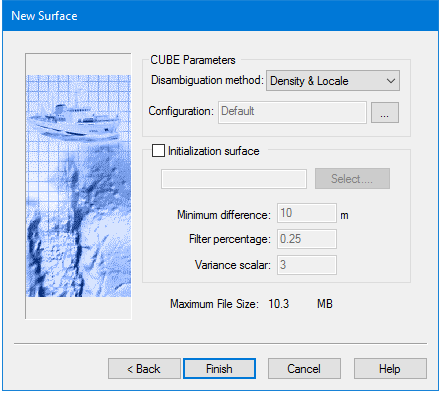
Options | Descriptions |
Disambiguation method | Select a disambiguation method from the drop-down list: • Density • Locale • Density and Locale (default) • Initialization Surface These methods are described in Disambiguation. |
Configuration | Default Configuration values will be applied unless you select otherwise. To apply other configuration options, click the […] Browse button to open the Advanced configuration dialog box and set different configuration values. |
Initialization Surface | If you select a disambiguation method based on density or locale, the Initialization Surface tests can be used as an optional filtering method. This filtering uses the depth and vertical uncertainty values in an existing surface (as the initialization surface) to exclude potential outliers from the new surface, using three filtering tests. The shoalest values from the three tests are then used as the threshold to filter outlier soundings. 1. Click Select and browse to the surface. |
Minimum Difference | A filtering test that uses a set distance from an existing surface node. For example, if the Minimum Distance is set at 10 metres, all soundings that are not within 10 metres of the node are excluded when a new surface is generated. |
Filter Percentage | A filtering test that uses a percentage of depth at a node. For example, if the depth at a node is 20 metres and the percentage value is 0.25, all soundings that are more than 5 metres from the node (20x0.25) are excluded from the new surface. |
Variance Scaler | A filtering test that uses a multiplier of vertical uncertainty at a node. For example, if the scaler is set to three and depth uncertainty for a node is one metre then soundings more than three metres (1x3) from the node are excluded from the processing of the new surface. |
Procedure
1. Select a disambiguation method.
2. [Optional] Set other configuration values in the Advanced configuration dialog box. See Advanced Options for Configuration - CUBE
3. [Optional] Select an initialization surface.
4. [Optional] Change the default values set for the filtering tests.
5. Click Finish to create the CUBE surface.