Interface
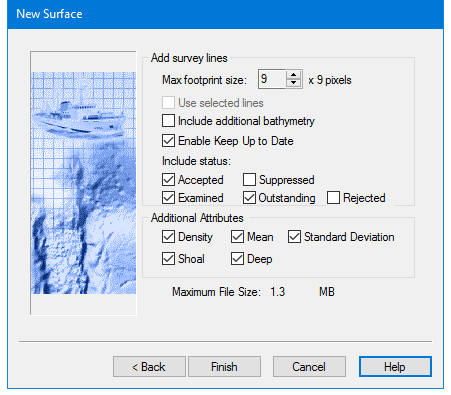
Use this dialog box to set parameters for data to be included in the new surface. Depending on the type of weighting method used to create the new surface, various options are available.
Option | Description |
Add Survey Lines | |
Max Footprint Size | Defines the maximum area in the Surface to which a sounding is applied. Use this value to prevent over-expansion of the footprint due to large depth spikes or very shallow grazing angles. This option is used by Swath Angle Weighting. |
IHO S-44 Order | Select an IHO S-44 Order from the drop-down list to apply the default value for the order selected. Alternatively, select User Defined from the list, and set values for a |
Use Selected Lines | If one or more track lines were selected before the surface creation process was started, this option is enabled. Other wise it is greyed out. 1. Select the check box to create the surface using only data from the selected line or lines. |
Include Additional Bathymetry | If water column bathymetry is present selecting this will add the data to the surface. |
Enable Keep Up to Date | This option is set to track the outdatedness of a surface. Enabled by default, this option must be set in order to use the Automatic Surface Update function in Tools > Options >Coverage. |
Include status: | By default, data with Accepted, Examined or Outstanding status are set to be included in the surface. Suppressed or Rejected data can be included in the surface by selecting the check box. |
Additional Attributes | |
Density | Creates an attribute layer that displays the density of soundings contributing to a node. |
Mean | Creates an attribute layer that displays the mean of all soundings contributing to a node. |
Standard Deviation | Creates an attribute layer that displays the standard deviation from the mean. |
Shoal | Creates an attribute layer that displays the shoalest soundings contributing to a node. |
Deep | Creates an attribute layer that displays the deepest soundings. |
Median | Creates an attribute layer that displays the median values of soundings contributing to the node. This option is used by Shoalest Depth True Position weighting. |
Horizontal TPU | Creates an attribute layer that displays the Horizontal TPU value for the shoalest sounding used for the Depth Attribute layer. This option is used by Shoalest Depth True Position weighting. |
Vertical TPU | Creates an attribute layer that displays Depth TPU value for the Shoalest sounding used for the Depth attribute layer. This option is used by Shoalest Depth True Position weighting. |
Procedure
1. Click the up and down arrow buttons to set a Max Footprint Size.
2. Select an IHO S-44 Order from the drop-down list
3. Enable the Use Selected Lines check box if you want to create the surface using only the selected line or lines.
4. Select Include Additional Bathymetry to include water column bathymetry added to project.
5. If you do not want to track outdatedness, de-select the Enable Keep up to Date check box.
6. Select or de-select the check boxes for specific status to include data in or hide it from the new surface.
7. Select one or many of the Additional Attributes to create a surface layer that displays that attribute.
8. Click Finish to create surface.
9. If creating a CUBE surface, click Next to enter further parameters.