Menu | Tools > Surfaces > New > Variable Resolution |
Tool |
|
Menu | Tools > Surfaces > New > Variable Resolution |
Tool |
|
Source data can often have widely varying point densities over a given area due to depth changes, survey coverage etc. When using fixed-resolution grids, it can be difficult to choose a single sampling resolution for the resulting raster model that maintains continuity over sparse areas, while preserving details where there is more data.
Variable resolution surfaces are surfaces in which the resolution can vary in different regions, while maintaining continuity across the entire surface. The desired resolution in discrete areas is determined using selected algorithms, instead of by setting a fixed resolution based on subjective choice.
The first step to create a variable resolution surface is to determine how to subdivide the region, and what the resolution of each sub-region (or tile) should be. One option is to select a parameter to define the required resolution in each tile. An alternative is to analyze the source data on several criteria to determine the optimum resolution for each.
The process starts by dividing data into regular tiles, in this case using a quad-tree-structure, recursively dividing binary space partitions until each tile contains the appropriate number of data samples.
Once the data area is subdivided a resolution for each tile must be determined using a resolution estimation method. The available methods are:
• Density (CARIS): which estimates the resolution based on source point density
• Density (Calder-Rice): which estimates the resolution based on point density over an area
• Ranges: which assigns a resolution based on a tile statistic (such as min., max., mean) and a look-up table of resolution vs. value.
The resulting quad-tree and computed resolution for each region are stored as the Resolution Map for the dataset. From this point, the source data is gridded in each tile using traditional techniques such as: inverse distance weighting, CUBE, Uncertainty, Mean, Swath Angle or a selected value.
Related commands:
• New Surface (Regular Gridded)
• Recompute Surface
Interface
Variable resolution surfaces can be created from track lines, raster surfaces or point clouds. Parameters for creating the surface are set in the New Variable Resolution dialog box:
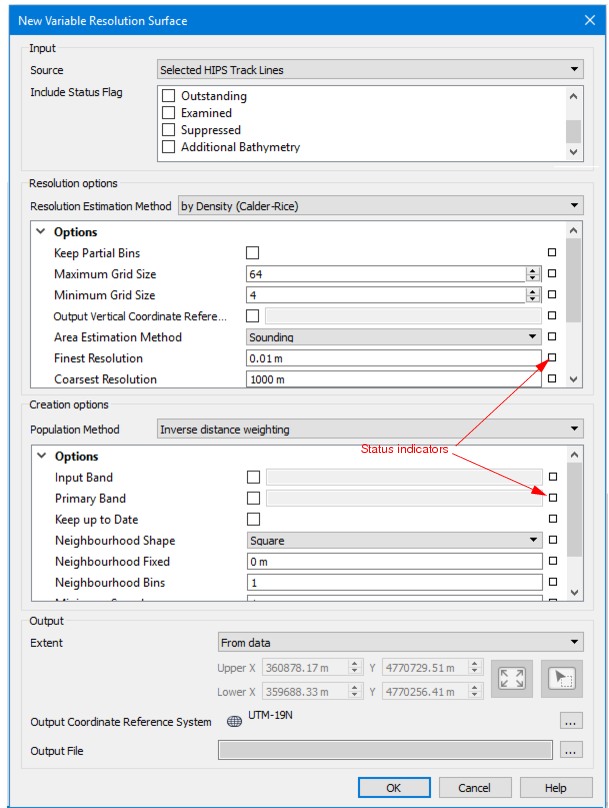
The fields in the dialog box are set to default values. If a setting is changed from the default, the status indicator box for the field changes to grey. Defaults can be restored by clicking on the indicator box and selecting “Reset”.
Option | Description |
Input | Set the input data for the new surface. |
Source | If a track line or lines was selected before launching the dialog box, the default source is set to “Selected HIPS Track Lines”. This can be changed to All HIPS Track Lines, or any open raster surface or point cloud displayed in the list. |
Status Flag | By default, only data flagged as Accepted will be included in the new surface. 1. Select the check box of another status to include data with that flag. |
Resolution options | Select an estimation method and set related options. |
Resolution Estimation Method | Select a method: • Density (Calder-Rice) to estimate resolution based on point density over coverage • Density (CARIS) to estimate resolution based on source point density • Depth assign a resolution based on a tile statistic |
Options | If you hover the cursor over the option name, a pop-up displays a short description. |
Creation options | Choose a population (interpolation) method to generate the surface, and set options related to the method. The interpolation method will place nodes at the centre and compute a depth value for each node. |
Population method | Select a gridding method that will populate the new surface based on one of these depth estimations: • Inverse distance weighting: depth is given by the mean of all samples in the specified neighbourhood, weighted by a function of the inverse of the euclidean distance from the sample to the node. • CUBE: several hypotheses will be calculated based on depth and uncertainty, and the strongest hypothesis returned • Uncertainty: depth is given by the mean of all samples in the resolution bin, weighted by a function of distance and sample uncertainty. • Mean: Use a depth range containing the average value of all points within the tile. • Swath Angle: value set using beam angle and footprint radius that defines the maximum area to which a points will be applied • Selected Value - a single value for the node is used to populate each cell based on the selection criteria set in the options |
Options | If you hover the cursor over the option name, a pop-up displays a short description. |
Output | Define the size of and projection for the surface, and location of the output file. |
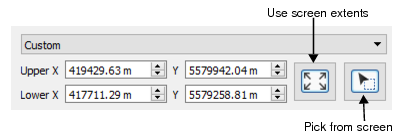
Extent | By default the extent of the surface will be set to the current zoomed view of the data. (“From data” setting.) Alternatively, select Custom to activate the coordinates fields below.
1. Click the Pick from screen to define a section of the displayed data. This changes the shape of the cursor. 2. Use the cursor to drag a box around an area. The Upper and Lower X and Y coordinates for the area will be updated. To create a surface from the full extent of the data: 3. Click the Use screen extents button. The displayed coordinates will be updated. |
Output coordinate system | Click Browse to open the Select Coordinate Reference System dialog box and set the output system. See Coordinate Reference System |
Output File | Set the name and location of the output surface file. |
Procedure
1. Select the New Variable Resolution Surface command.
2. In the dialog box, select an Input Source.
3. Select which type of data to include based on its status flag assigned.
4. Select a resolution estimation method and set its related options.
5. Set a Population method to populate the surface and set related options.
6. Set the extent for the surface.
7. Select the coordinate reference system for the surface.
8. Set a name and location for the output file.
9. Click OK.