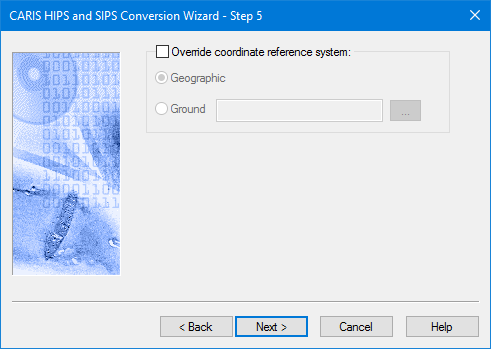
The LAS import process is able to automatically read the Coordinate Reference System (CRS) from the file during import. An option is available in Step 5 of the wizard to override the automatically determined CRS if it is either missing or invalid. If Override is selected, then Geographic or Ground can be selected as described in Set Navigation Coordinate System.
LAS or LAZ files can contain either elevation or hydrographic data.
Status flags
Data being imported may be already flagged with one or more of the following flags:
• Synthetic,
• Key_Point,
• Overlap,
• Withheld.
These input flags are mapped to a status flag during conversion to HIPS format. Any data carrying more than one input flag will be mapped to the highest priority status flag, as follows: “Designated” will be applied over “Rejected by disabled beam”, “Rejected by disabled beam will be applied over “Accepted”.
GPS Reference week
LAS data that stores time as GPS seconds uses the survey date in the file header. This is the default setting. Another reference week can be set, but this option is not used during conversion if the LAS file timestamps use the “standard” GPS time, or Absolute GPS time, which is the actual number of seconds elapsed since 6-Jan-1980.
By default, the start day is Sunday. If, for example, the survey week runs from Wednesday to Tuesday, Wednesday can be set as the start day for the survey week. Sunday is “rolled over” and data for the full week.
Interface
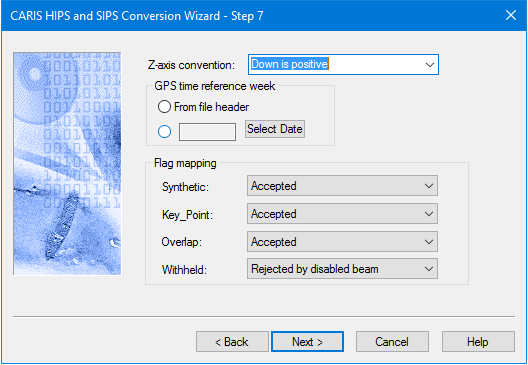
Options for converting LAS or LAZ data to HIPS are displayed in this dialog box.
Option | Description |
Z-axis convention | The height convention of the depths being converted. By default, the options is set to the HIPS “positive down” depth convention. To change this setting: 1. Select “Up is Positive” from the drop-down list. |
GPS time reference week | Reference weeks are used for time-stamps in GPS week seconds, which always start at 0 at midnight Sunday for that week they were recorded. By default the From file header option is set so that the date of the start of the reference week, is taken from the file header. To set a specific reference week:, 1. Select the button beside the date field, and click Select Date. 2. Select the reference date from the calendar picker. See Add Date. |
Flag Mapping | LAS source data may have one or more flags already set before conversion. By default, the LAS “Synthetic”, “Key_Point” and “Overlap” flags are set to “Accepted”. The Withheld flag will be set to “Rejected by disabled beam”. 1. Map input flags to “Accepted”, “Designated” or “Rejected by disabled beam” status. Input data with more than one flag will be mapped to the highest priority status flag on import, as follows: “Designated” will be applied over “Rejected by disabled beam”, “Rejected by disabled beam will be applied over “Accepted”. |
Procedure
1. Set options for Invert Elevation and GPS Reference week.
2. Set Flag Mapping options.
3. Click Next to continue the conversion process.