Menu | Select > Master/Slave Relationships |
Select and view master/slave relationships and add masters and slaves to the selection.
A master/slave relationship is a hierarchical relationship between features at the same location. One feature is designated the master, others are its slaves. For example, a buoy could be a master and attached equipment such as lights and navigational devices would be its slaves.
Related commands:
• Remove Others from Selection • Remove |
Interface
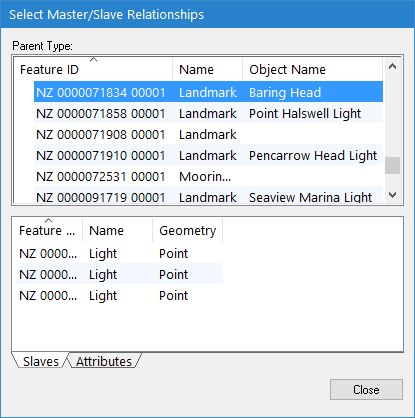
The Select Master/Slave Relationships dialog box is displayed.
Panel | Description |
Parent Type | A list of masters. Contains the following information: • Feature ID: The feature object ID • Name: The attribute name of the master object • Object Name: The user-specified name assigned to the master object |
Slaves | A list of the slaves of the selected master. |
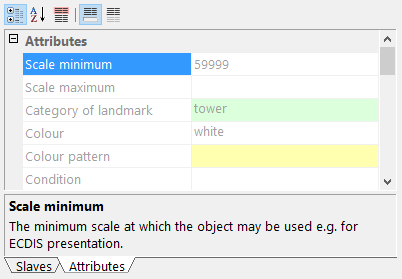
Attributes | The attributes of the selected master. The attribute values are read-only.
|
Procedure
1. Select the Select Master/Slave Relationships command.
2. Add features to the selection or create a new selection using the various pop-up menus.
Menu item | Description |
Parent Type | |
Add to Selection From > All Masters | Add all listed master features to the existing selection. |
Add to Selection From > This Master | Add selected master features to the existing selection. |
Add to Selection From > Slaves of this Master | Add all slaves of the selected master to the existing selection. |
Create Selection From > All Masters | Create a new selection from all listed master features. |
Create Selection From > This Master | Create a new selection from the selected master feature. |
Create Selection From > Slaves of this Master | Create a new selection from the slaves of the selected master feature. |
Slaves | |
Add Slave to Selection | Add the selected slaves to the existing selection. |
Create Selection from Slave | Create a new selection from the selected slaves. |