Menu | Select > Features > Coordinate Range |
Select all features within a specific circular range of a given coordinate.
Related commands:
• Select Features Inside Areas | • Remove Others from Selection • Remove |
Procedure
1. Select the Coordinate Range command.
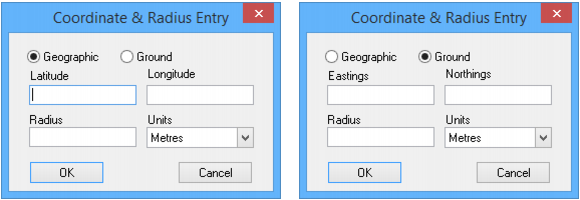
The Coordinate & Radius Entry dialog box is displayed.
2. Select Geographic or Ground.
The coordinate labels are Latitude or Longitude if you select Geographic, and Easting and Northing if you select Ground.
3. Type values in the coordinate fields.
4. Type a value for the Radius.
This determines the size of the area around the coordinates.
5. Select Metres or Nautical Miles from the Units list.
6. Click OK.
All features within the specified radius are selected.