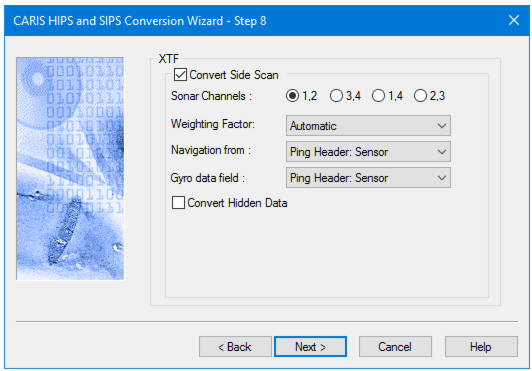
If you do not want to convert side scan data, click Next to go to further options.
Note: Contact records created in Triton ISIS are also imported into HIPS when associated XTF data is imported. |
Option | Description |
Convert Side Scan | 1. Click the check box to enable the side scan conversion options. |
Sonar Channels | 1. Select one of the four channel pairs by clicking its radio button. |
Weighting Factor | Weighting factors for these XTF sonar types will be applied if the “Automatic” is selected. • 24 (Edgetech Black Box) • 35 (Edgetech MP-X) • 38 (Edgetech 4200 • 8 (Kongsberg SAS) • 56 (Edgetech 4600) When the sonar type is unknown (0) no scaling is applied. 1. Set a weighting factor: • None • Automatic (default setting) • Always The weighting factor set is retained for next use. |
Navigation from | From drop-down the list, 1. select the source for reading the data for the towfish. |
Gyro data field | From the drop-down list. 1. Select the source for reading gyro data. |
Convert Hidden Data | The XTF format flags any pings repeated over an area as hidden data. 1. Select the Convert Hidden Data check box to include hidden data in the SIPS project. |
Procedure
1. Set options.
2. Click Next to set Layback options