EdgeTech JSF format, as stored in *.jsf files, can store bathymetry and side scan data.
Edgetech JSF conversion reads navigation from the sonar positions records (3004) as the primary navigation. If they are found, they will be written out as ship navigation. If no sonar position records are found, NMEA records (2002) are written out as ship navigation. If no NMEA records are found, the position data in sonar data records (80) are written out as ship navigation.
Interface
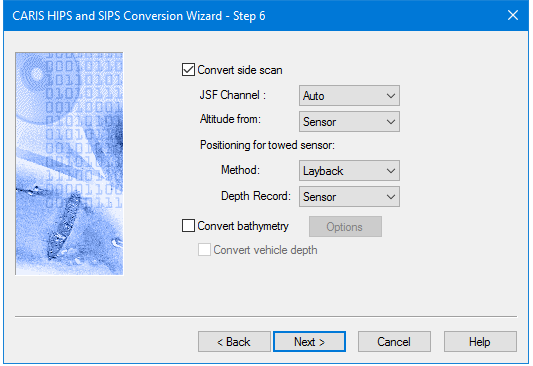
Options for converting Edgetech JSF data to HIPS are displayed in this dialog box.
Option | Description |
Convert Side Scan | The check box is enabled by default, to enable conversion of side scan data. To omit conversion of side scan data, de-select the check box. This will also disable the options listed below it. |
JSF Channel | Select the frequency channel to convert. Auto is the default setting • Auto: converts low frequency if it exists • High: High frequency • Low. low frequency |
Attitude from: | Select Sensor or Discover-2. • Sensor is the default setting |
Positioning for towed sensor | Method: Select Layback or Cable out. Layback is the default setting. Depth record: Select from Sensor or Discover-2. Sensor is the default setting. |
Convert Bathymetry | To convert JSF bathymetry data, 1. Select the Convert bathymetry check box. 2. Click Options to open the Bathymetry Filtering options dialog box. See Bathymetry Filtering Options. |
Convert vehicle depth | Stores the depth, or depth calculated from pressure, from the 3002 message as HIPS delta draft/subsea depth. 1. Enable the check box to convert Convert Bathymetry option must be enabled. |
Procedure
1. Set options.
2. Click Next to continue conversion process.