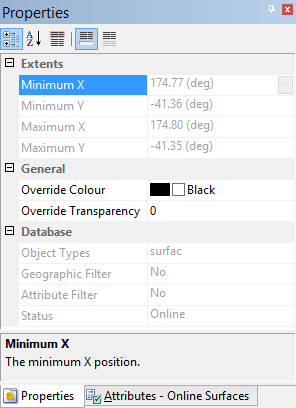
Selecting a database query layer in the Layers window displays properties for the query in the Properties window.
The Extents properties provide the minimum and maximum latitude and longitude coordinates of the data available in the selected query. These properties are updated if additional data is added to the database that falls outside of the current extents of the query.
The General properties provide display settings for the layer:
• Override Colour: This property can be used to display database objects in a colour other than the default. Select a colour from the drop-down list and click the check box to enable the option.
• Override Transparency: This property can be used to apply a transparency percentage to the display. This allows layers behind the query layer to be visible.
The Database properties provide basic information about the selected query layer:
• Object Types: This property provides the types of database objects that are included in the query.
• Geographic Filter: This property states whether or not the query is using an extents filter.
• Attribute Filter: This property states whether or not the query is using a rule file to filter by attributes.
• Status: This property provides the status setting of the objects that are included in the query.