Menu | Tools > Engineering Analysis > Shoals > Detect Shoals |
Tool |
|
The Detect Shoals command is used to identify shoals in the currently selected surface.
To detect shoals:
1. In the Layers window, select a layer with depth values from the surface for which you want to identify shoals.
Menu | Tools > Engineering Analysis > Shoals > Detect Shoals |
Tool |
|
Shoals should only be detected on bathymetry with true depths. You should not detect shoals on a difference surface or other files that do not contain true depths.
2. Select the Detect Shoals command.
The Detect Shoals dialog box is displayed.
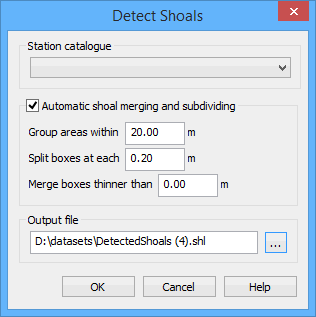
You must select a station catalogue in order to associate the shoals with the current reference model. The station catalogue contains:
• the alignment that is used to determine shoal orientation,
• the template that is used to determine the reference depth and shoal clearances,
• the reach that is used to identify the area in which the shoal was found, and
• the partitions used to determine shoal severity classifications.
This selection will be remembered in other shoal-related dialog boxes used in future procedures.
Only station catalogues with a single alignment-template pairing are available to be selected in this dialog box. |
3. Select a Station catalogue from the list.
During detection you can have shoals automatically grouped, split and merged based on the size and location of each shoal.
• Grouping causes shoal areas to be assigned to the same group of boxes if the areas are within the set distance of each other.
• Splitting causes shoal areas to be created at each multiple of the interval value. This allows the shoal areas that are more critical to be displayed separately from the areas that are less shallow.
• Merging causes shoal boxes to be combined if they are smaller than a specified value.
4. [Optional] Click the Automatic shoal merging and subdividing check box to enable the options.
5. If automation is enabled, enter a value for each option.
6. Click Browse (...) for the Output file field to define a name and location for the shoal files and layers.
If you enter a name that is already being used by another shoal file, a message will be displayed when you click OK, warning that the original file will be overwritten. You can choose to continue, or cancel and enter a different name.
7. To finish, click OK.
The shoals are detected and saved to a pair of files:
• A HOB map file (.shl) containing the shoal data.
• A CSAR file (.csar) containing the bathymetry around the shoal areas as it was at the time of detection.
The .shl file can be opened at any time using the Open command. See the Open topic in the File Menu chapter of the CARIS BASE Editor Reference Guide for more information.
The shoals are represented in the Display window by Shoal Area (shlare) and Shoal Box (shlbox) features.
Layers are added to the Layers window for each of the shoal feature types.
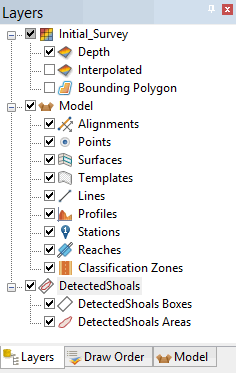
To access the shoal areas or shoal boxes in the Display window, you must have the appropriate layer selected.
The shoal boxes are created parallel to the alignment in the station catalogue based on the shoal areas grouping and the splitting interval. There can be multiple area groups in a single survey. The groups can be changed manually if necessary. See Group Areas for more information.
