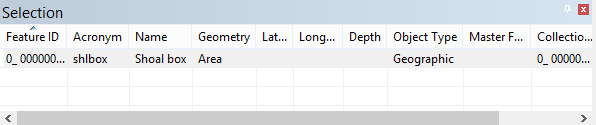
Once shoals have been detected, you can view the attributes of each shoal in the Selection and Attributes windows.
To view a shoal’s attributes:
1. Select either the Shoal Areas or Shoal Boxes layer in the Layers window.
The feature type selected will determine which attributes are displayed in each window. |
2. Select a shoal in the Display window.
3. View the Selection window.
Selection window information
The information for the selected shoal is populated in the window.
The following information is provided:
Field | Description |
Feature ID | The feature ID of the shoal area or box selected. |
Acronym | The object acronym of the selected feature: shlare for shoal areas, shlbox for shoal boxes. |
Name | The full name for the object acronym of the selected feature. |
Geometry | The feature type of the selected feature. |
Lat,Long (X, Y) | The coordinates of the shoal. |
Depth | The depth of the shoal. |
Object Type | Geographic, Cartographic, Meta, etc. |
Collection Feature ID | The ID of the group to which the selected shoal belongs. |
Area | The size of the area covered by the shoal area or box. |
Length | The length of the shoal. |
Other information can be displayed for the selected shoals using the Column Settings dialog box. To access this dialog box, right‑click the column headings and select More. See the Getting Started chapter in the CARIS BASE Editor Reference Guide for more information on the Column Settings.
Attributes window information
4. If not already visible, open or select the Attributes window.
The information for the selected shoal is populated in the window. 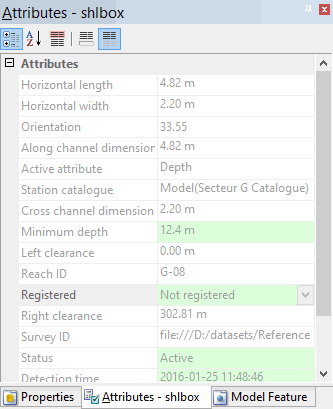
Different attributes will be displayed depending on whether you have a shoal area or a shoal box selected. Shoal area attributes include the reference depth range for the shoal area. Shoal box attributes provide all information about the shoal box, such as:
• Horizontal length and width of the shoal box
• Minimum depth of the shoal and template depth
• Active surveys that intersected with the shoal when it was detected
• Shoal ID
• Status of the shoal
If importing shoals from a database, only those attributes that have been specified in the database shoal record associations (SRA) file will be provided in the Attributes window. See Edit Record Association File for more information on SRA files. |
The attributes in this window are read-only, meaning they cannot be changed directly from the window. If you wish to change an attribute value, the change will need to be made using one of the shoals tools.