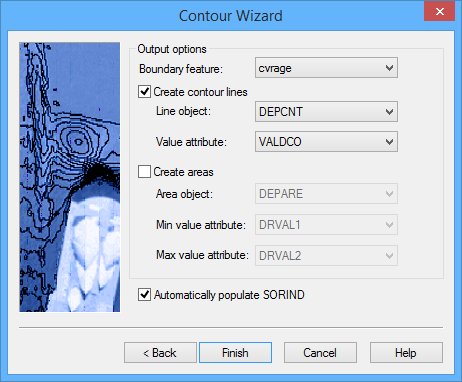
In this step of the Contour Wizard, you will define the object and attribute acronyms that will be used to create the features resulting from this procedure.
A by-product of generating contours is a bounding polygon feature, which represents the inside and outside extent of the data used to derive the contour lines. By default, this feature object is created using the cvrage object acronym (Coverage Area); however, the possible acronyms are controlled by the catalogue of the feature layer being used to create the contours. If the cvrage acronym does not exist in the catalogue of the feature layer being used, the first acronym in the list will be selected instead. All open contours are connected to the boundary by connected nodes.
For the bMIO format, a metadata object such as M_QUAL can be used for the boundary object. |
You have the option of outputting both contour lines and areas, or just one of the two.
If using the Bathy DataBASE catalogue, the Line object field is set to DEPCNT by default and the Value attribute field is set to VALDCO. For area features, the Area object is set to DEPARE by default and Min value and Max value are set to DRVAL1 and DRVAL2, respectively.
Interface
The Output Options step of the Contour Wizard uses the following dialog box.
Option | Description |
Boundary feature | The object acronym that will be used to create the boundary feature. |
Create contour lines | Click the check box to enable this option if you want to generate contour lines. |
Line object | The object acronym that will be used to create the contours. Select an option from the drop-down list. |
Value attribute | The attribute acronym that will be used to assign values to the contours. |
Create areas | Click the check box to enable this option if you want to generate area features. |
Area object | The object acronym that will be used to create the areas. |
Min value attribute | The attribute acronym that will be used to assign minimum values for the areas. |
Max value attribute | The attribute acronym that will be used to assign maximum values for the areas. |
Automatically populate SORIND | Click to automatically populate the SORIND (source indication) attribute value for the contours and areas during creation. |
Procedure
1. Select an object acronym for the boundary feature.
2. Complete any necessary fields for the features to be created.
3. Click Finish.
If the number of contours to be created exceeds the amount of memory available to complete the procedure, an error message will be displayed. You may be required to restart the application to clear your virtual memory if this happens. |
The contour line and/or depth area features are created.
If the output layer is using the Bathy Database catalogue, any isolation type contours will have the Isolation Type (isotyp) attribute populated automatically. This attribute defines whether the contour contains a shoal (shoaler than the surrounding elevation values) or a deep (deeper than the surrounding elevation values), or is unknown. This attribute can be used to filter the contour features or to resolve isolations when creating depth areas in the future. The isotyp value for a selected contour can be updated in the Attributes window.