Below is an outline of the P/V/D/L structure for a project called Gilligan with a vessel called Minnow. The project contains three line files.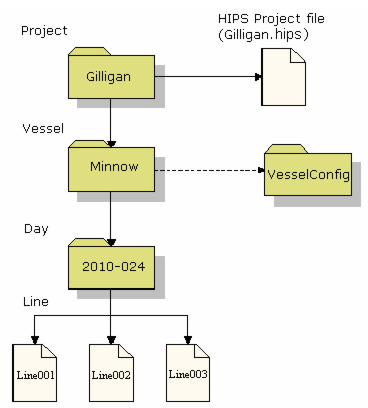
Not only does the P/V/D/L structure provide a consistent path for data retrieval. You can also take advantage of a feature in the Conversion Wizard that lets you open for conversion at any level of the P/V/D/L folder structure and maintain that structure through conversion.
For example, a new project called “Gilligan” is created by the New Project wizard without adding a vessel or survey days to the project definition.
Raw data is then converted to HIPS and SIPS format through the Conversion Wizard. The File Selection Type is set to “Project” in Step 2 of wizard. The converter then knows that data is stored in the P/V/D/L structure and that you are loading from the Project level. All folders on the next level are interpreted as vessel names and the level after that as survey days.
Each vessel name must exist in the VesselConfig directory, otherwise the converter will report errors. In this example, there is only one vessel folder, called “Minnow,” and it contains several survey days. There happens to be a HVF in the VesselConfig directory called “Minnow”, so the converter creates the vessel folder beneath the project name “Gilligan” in the Project directory and also all of the survey days that are necessary. If the survey days or the vessel are already present, the converter uses them.
Finally, all of the lines found are converted.
To convert raw data that is not stored in the P/V/D/L structure, simply set the file selection type to “Raw” and select the files individually.
Below is an outline of the P/V/D/L structure for a project called Gilligan with a vessel called Minnow. The project contains three line files.
In addition to the folder containing the vessel info, the Project directory also contains the HIPS file (*.hips) of the projection information used by the HIPS and SIPS interface to define the default projection for that project. When HIPS and SIPS accesses the navigation data (which is stored in un-projected latitude and longitude), the data is projected using the projection stored in this file. The HIPS file is given the same name as the project.
For information on creating a new project see New Project.
The name of the vessel in the P/V/D/L path provides the link to the actual HIPS Vessel File and therefore must be spelled the same as the HVF in the VesselConfig directory. The data cannot be processed if the HVF is not present or if the vessel name in the P/V/D/L path is misspelled.
The survey day in the P/V/D/L structure is composed of two components separated by a hyphen—the four-digit year and the three-digit Julian date. The date used in the Day directory name does not actually play a role in data processing—it is used as a convenient mechanism for organizing survey data.
When a new project is created, this P/V/D/L directory structure is built and the HIPS file is generated. The vessel file must exist in the VesselConfig directory at the time the project is defined, however it can be modified at any time (providing the name is not changed).