Menu | Tools > SIPS Mosaics > New > GeoCoder |
Tool |
|
Menu | Tools > SIPS Mosaics > New > GeoCoder |
Tool |
|
Create a mosaic using GeoCoder functionality from UNH.
GeoCoder processes multibeam backscatter, both beam-averaged and the higher resolution time-series returns, as well as side scan sonar data.
Related commands:
Create SIPS Mosaic using Backscatter
Create SIPS Mosaic using Side Scan
Interface
A new mosaic using backscatter data is created using the Create SIPS Mosaic using Geocoder dialog box.
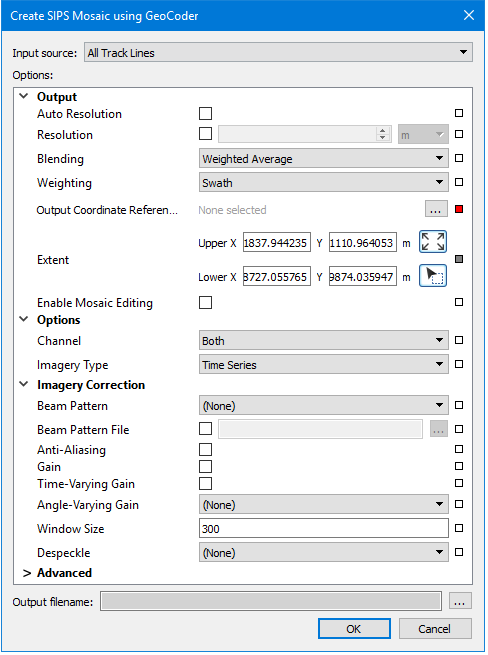
Procedure
1. Zoom/pan to display the extents of the data that you want included in the mosaic.
2. Select one or more track lines. If no track lines are selected, the mosaic will be created using on all open track lines.
3. Select the New SIPS Mosaic using Geocoder command.
The Create Mosaic dialog box is displayed.
4. Set the Input Source for the mosaic.
5. Select Auto Resolution, or set value in the Resolution field.
6. Set a Coordinate Reference System for the mosaic.
7. Enter Options, Imagery Corrections and Advanced options as they relate to the type of mosaic engine being used.
See SIPS Mosaic Options for details on settings.
8. Click Browse and set name and path for the output mosaic.
9. Click OK.
The new mosaic is displayed in the Display window and is listed in the Layers window.
