A raw side scan sonar display with a digitized seabed is shown below.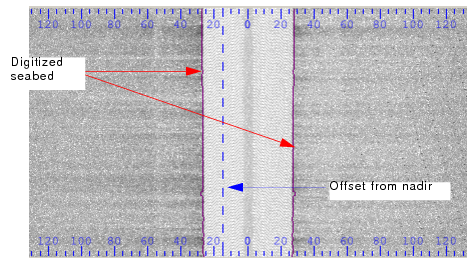
Before side scan data can be processed, the altitude of the sonar must be known. With some sonars, altitude is logged in the raw data files and is converted by SIPS. However, in other cases, altitude is not logged or is logged and needs to be edited. Side Scan Editor provides automated and manual tools to digitize the bottom directly from the side scan trace along the first bottom return.
A raw side scan sonar display with a digitized seabed is shown below.
Digitization and colour maps
Sometimes there is no clear distinction between the water column and the seabed. You can compensate for this by adjusting the display of intensity values in the editor so that the seabed and water column are clearly outlined.
1. From the Properties, select a colour file that only displays two colours in the Side Scan View. An example is the default colour GreyScale.cma.
2. Use the sliders in the colour histogram to adjust the display in the editor.
3. Once the there is clear distinction between the water column and seabed use the digitizing tools to trace the first bottom return.