 CARIS HPD Paper Chart Editor
 CARIS HPD Paper Chart Editor
CARIS HPD Product Editor
CARIS HPD Source Editor
CARIS S-57 Composer
CARIS Paper Chart Composer
Menu | Edit > Areas > Dissolve |
Tool |
|
Remove a selected area and have its geometry filled by a surrounding unselected area.
The Dissolve Areas command can be used on one or more areas, although the results will vary depending on the position of the areas in relation to other features:
• If the area being dissolved is bordered by multiple features or intersects other features, a hole is left.
• If multiple areas are dissolved, they are all filled by the next unselected surrounding area.
• If multiple areas are dissolved and there is no surrounding area, a hole is created.
If the original area is part of a database, it is moved to the Deleted Features layer. It must be certified before it is permanently deleted.
If the original area is part of a stand-alone file, it is permanently deleted.
Related commands:
• • • • | • • • |
Procedure
1. Select one or more areas.
2. Select the Dissolve Areas command.
The area is dissolved. Depending on its position, it is filled by a surrounding area or a hole is created.
Example
In this example, you want to remove a small DEPARE area.
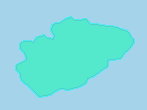
If you delete the selected area using the Delete Features command, a hole will be left in the surrounding area.
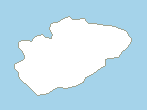
If you use the Dissolve Areas command, the selected area is dissolved and replaced by the surrounding area.
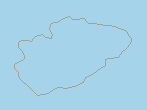
Note that any line, such as a depth contour, that surrounds the selected area will not be removed.
