 CARIS HPD Paper Chart Editor
 CARIS HPD Paper Chart Editor
CARIS HPD Source Editor
CARIS Paper Chart Composer
Menu | Create > Annotations > Superselection Create > Annotations > Selection |
An annotation is a text, symbol, or image feature that is created using attribute values of another related feature. Annotations can be any of the following:
• point-justified text
• curved-line text
• block text
• symbols
• symbol patterns
• TIFF images.
Annotations are based on the attribute values of other features. You can create annotations for one feature or for multiple features simultaneously.
Annotations can be updated automatically when the source feature attribute values change.
This example show LIGHTS and BOYLAT (lateral buoy) features with light information ($ltinf) and buoy name ($bynam) as annotations.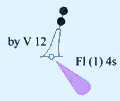
Annotation display is set from the annotation control file, which is associated with the chosen portrayal value. This file lists the annotation styles and associated files.
For more information on annotation files and portrayal, see Portrayal.
Annotations cannot be created for features not listed in the annotations file. Make sure you can create an annotation for the selected features. |
Related commands:
• | • |
Procedure
1. Select one or more features.
2. Select the Create Annotations command.
If you are prompted for an annotation rule, the Select Annotation Rules dialog box is displayed.
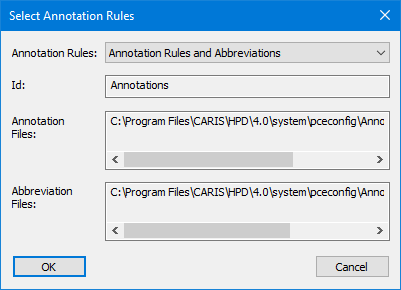
3. If necessary, select an annotation rule.
Most portrayals contain references to annotation rules and this step is not necessary.
Annotations are generated for the selected features. All annotations have an initial status of Under Construction.
If a selected feature already has an annotation, it will be skipped. If there are no annotation rules for a feature, that feature will also be skipped. |
For more information about annotations, see Portrayal.