 CARIS HPD Paper Chart Editor
 CARIS HPD Paper Chart Editor
CARIS HPD Product Editor
CARIS HPD Source Editor
CARIS S-57 Composer
CARIS Paper Chart Composer
Menu | Select > Features By > Certification Status |
Tool |
|
Select features based on certification status.
Related commands:
• • • • • • • • • • • • | • • • • • • • • • • • • |
Interface
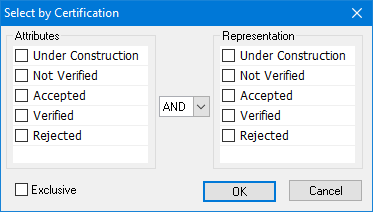
Option | Description |
|---|---|
Select the status | Select one or more certification statuses using one of the following methods: To filter on attributes or representation only: • Select one or more items from the appropriate list. To filter on both status types: • Select one or more items from the Attributes list. • Select AND or OR. • Select one or more items from the Representation list |
Exclusive | Off: The filter will select only the features that meet the criteria. On: The filter will select all features except those that meet the criteria. |
Procedure
1. Select the Create by Certification Status command.
The Select by Certification dialog box is displayed.
2. Select the necessary statuses.
3. Click OK.
Features are selected.
