CARIS HPD Publications Module
 CARIS HPD Publications Module
Menu | File > Open > Project |
Tool |
|
Key | Ctrl+O |
Open a project.
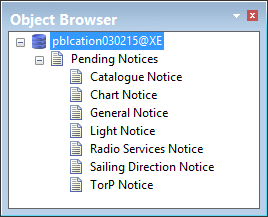
When a project is opened, Pending Notices layers are displayed in the Object Browser. Notices can be created in the Pending Notices layers and moved to a publication at a later time.
If you are capturing data from a paper chart in HPD, the project must belong to the same schema as the chart.
Related commands:
• • • • | • • • • |
Procedure
1. Select the Open Publications Project command.
The Oracle Login dialog box is displayed.
2. Type a Username and Password.
3. Select a Database from the list.
4. Click Connect.
The Select Project dialog box is displayed.
5. Select a project and Click OK.
When a project is opened, a list of notice types is displayed in the Object Browser.