 CARIS HPD Publications Module
 CARIS HPD Publications Module
Menu | Publication > Add Objects to Section |
Pop-up | Add to Section (Object Browser) |
Move a pending notice to a publication.
The Add Objects To Section command is available only if a publication is open and a notice section has been added to it.
You can also move pending notices to a publication by drag-and -drop in the Object Browser.
Related commands:
• • • • • • • | • • • • • • • |
Interface
Option | Description |
|---|---|
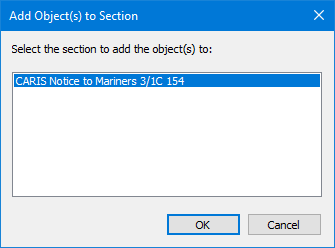
Select the section to add the objects to | A list of open publications and sections. 1. Expand the publication. A list of sections is displayed. 2. Select a section. |
Procedure
1. Select a notice in the Pending Notices list of the Object Browser.
2. Select the Add Objects to Section command.
The Add Object(s) to Section dialog box is displayed.
3. Select a section.
4. Click OK.
The notice is moved from the pending folders to the publication and is now a section in the publication.