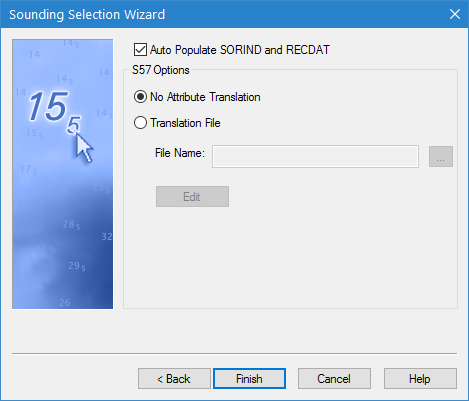
The fourth step of the Sounding Selection Wizard allows you to map the coverage attributes to S-57 attributes using a translation file. The translation file has a BSST file extension and is in XML format.
Interface
Option | Description |
|---|---|
Auto Populate SORIND and RECDAT | On: Source information (SORIND) and recording date (RECDAT) values for the new soundings are automatically populated. Off: The attribute values are not populated. |
Translation | Choose whether or not to apply attribute mapping using a translation file. • No Attribute Translation: Attribute translation will not be applied. • Translation File: Attribute translation will be applied. Select the translation file or create a new file using the File Name option. • Edit: Display the Edit Translation File tool. This lets you edit the selected translation file or create a new one. |
Procedure
1. [Optional] Enable the Auto Populate SORIND and RECDAT option.
2. Select a Translation option.
3. If the Translation File option is selected, select or create a translation file.
4. Click Finish.
The soundings that pass the suppression filter are selected and corresponding soundings are created on the selected feature layer. The new filtered sounding layer can be exported to a HOB file using the Save command, if desired.