 CARIS HPD Paper Chart Editor
 CARIS HPD Paper Chart Editor
CARIS HPD Product Editor
CARIS HPD Source Editor
CARIS S-57 Composer
CARIS Paper Chart Composer
Menu | File > New > Layer By > Feature Type |
Tool |
|
Pop-up | Add Layer > Feature Type (Layers window) |
Create layers according to feature type. This could be used to select or edit all features of a specific type.
You can create another layer or further filter the new layer using any of these related commands:
• • • • • • • • | • • • • • • • |
Interface
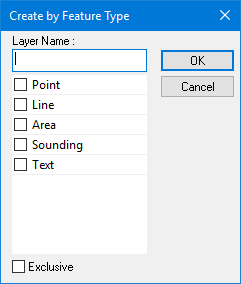
Option | Description |
|---|---|
Layer Name | A name for the layer. Type in the box. |
Select the feature type | Enable one or more feature types. |
Exclusive | Off: The filter will select only the features that meet the criteria. On: The filter will select all features except those that meet the criteria. |
Procedure
1. Select a layer.
2. Select the Create Layer by Feature Type command.
The Create by Feature Type dialog box is displayed.
3. Select one or more feature types.
4. [Optional] Enable Exclusive.
5. Click OK.
A layer containing the features that meet the criteria is created.
