 CARIS HPD Paper Chart Editor
 CARIS HPD Paper Chart Editor
CARIS HPD Product Editor
CARIS HPD Source Editor
CARIS S-57 Composer
CARIS Paper Chart Composer
Menu | Tools > Report > Generate Statistics |
Generate a report of statistical information on the features in the selected layer. Statistics can be generated based on:
• Feature types
• Attributes of the features in the source layer
• Area measurements of polygons on the source layer.
The statistics are in the Summary box in the dialog box and can be saved to a comma-separated value (.csv) file if desired.
Related commands:
• • • • | • • • |
Interface
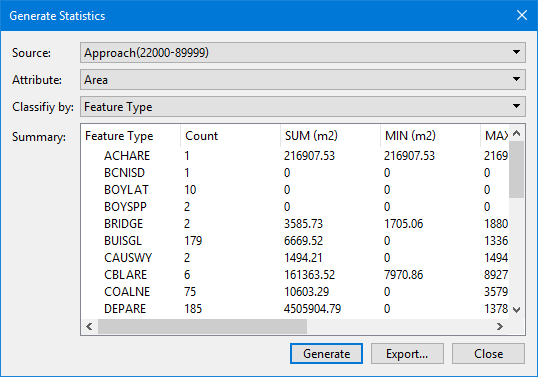
Option | Description |
|---|---|
Source | The layer containing the data to be analyzed. The list contains all vector data layers currently open. If the list is empty, there are no data sources in a supported format open. If you change the Source after defining other options, those options to be reset to Select from the list. |
Attribute | The attribute used to calculate statistics. The list contains all common attributes. For some formats, this will include the attributes that are common to all features on the layer. For other formats this will include the attributes that are common to all features in the catalogue of the data source for the layer. You can also calculate the statistics based on feature type or on the area measurement of the features. |
Classify by | The attribute used to group data into bins in the statistics report. This allows the data to be classified by feature type or by common attributes. A new row (bin) is added to the results for each unique value found for the selected attribute. If features have no value or have a value of UNKNOWN, NULL or UNDEFINED, they will be reported in a separate row called (No Value). If this option is set to |
Summary | A summary of the statistics generated according to the selected values. This box will be blank until the you click Generate. if you reset any of the options, the summary will also be reset. The rows in the table include: • a row for each classification value if an attribute was selected using Classify by. If Classify by is not defined, the statistics will all be provided in a single row • a Total row that contains the totals for each column. The columns in the table include: • <classification>: The attribute used to create data bins when Classify by is defined. • Count: The number of items in each bin. • SUM: The sum of all items in each bin. • MIN: The minimum value of the items in each bin. • MAX: The maximum value of the items in each bin. • MEAN: The average value of the items in each bin. • Percent: The percentage of the data in the layer that is represented by the data in each bin. • Percent Count: The percentage of the total feature count in the layer that is represented by the features in each bin. The values in the table are controlled by the units and precision settings in Tools > Options > Units. If the attribute being calculated has a text value, SUM, MIN, MAX, MEAN and Percent will be displayed as 0 or NaN. |
Generate | Generate statistics for the selected layer according to the specified settings and display them in the Summary field. A message will be displayed if the selected source layer does not contain any feature objects. |
Export | Export the table of statistical values to a You will be prompted for a file name and location. |
Procedure
1. Select the Generate Statistics command.
The Generate Statistics dialog box is displayed.
2. Select the Source of the statistics.
3. Select the Attribute to use for calculating the statistics.
4. Select the attribute by which to classify the data.
5. Click Generate.
Statistics are calculated and displayed in the Summary field.
6. [Optional] Click Export.
A file like this is created.
"Feature Type","Count","SUM (m2)","MIN (m2)","MAX (m2)","MEAN (m2)","Percent","Percent Count" "ACHARE","1","216907.53","216907.53","216907.53","216907.53","0.712424527","0.068540096" "BCNISD","1","0","0","0","0","0","0.068540096" "BOYLAT","10","0","0","0","0","0","0.68540096" "BOYSPP","2","0","0","0","0","0","0.137080192" "BRIDGE","2","3585.73","1705.06","1880.67","1792.86","0.011777188","0.137080192" "BUISGL","179","6669.52","0","1336.59","37.26","0.021905774","12.268677176" "CAUSWY","2","1494.21","0","1494.21","747.11","0.004907684","0.137080192" "CBLARE","6","161363.52","7970.86","89277.52","26893.92","0.529992337","0.411240576" "COALNE","75","10603.29","0","3579.64","141.38","0.034826089","5.140507197" "DEPARE","185","4505904.79","0","1378644.49","24356.24","14.799472914","12.679917752" "DEPCNT","94","300978.9","0","129982.19","3201.9","0.988553744","6.44276902" "DRGARE","5","33659.71","1642.56","12723.94","6731.94","0.110554041","0.34270048" "DRYDOC","1","3477.1","3477.1","3477.1","3477.1","0.011420399","0.068540096" "LIGHTS","10","0","0","0","0","0","0.68540096" "LNDARE","25","2824237.38","22.61","1100492.51","112969.5","9.276100274","1.713502399" "M_COVR","1","7363801.87","7363801.87","7363801.87","7363801.87","24.186127206","0.068540096" "M_NSYS","1","7363801.87","7363801.87","7363801.87","7363801.87","24.186127206","0.068540096" "M_QUAL","1","7363801.87","7363801.87","7363801.87","7363801.87","24.186127206","0.068540096" "NAVLNE","2","0","0","0","0","0","0.137080192" "RESARE","2","284731.58","116433.17","168298.4","142365.79","0.93519004","0.137080192" "ROADWY","118","0","0","0","0","0","8.087731323" "SILTNK","3","0","0","0","0","0","0.205620288" "SLCONS","51","1368.07","0","1056.39","26.82","0.004493372","3.495544894" "SOUNDG","673","0","0","0","0","0","46.127484578" "TOPMAR","2","0","0","0","0","0","0.137080192" "UWTROC","7","0","0","0","0","0","0.479780672"
"Total","1459","30446386.92","0","7363801.87","20867.98","100","100" |