 CARIS HPD Product Editor
 CARIS HPD Product Editor
CARIS S-57 Composer
Menu | Edit > Soundings > Group By Area |
Group soundings by one or more geographic areas defined by one or more area feature codes.
Sounding groups are created for two or more soundings. Sounding groups store sounding data more efficiently by combining each group of soundings with identical attribute values into a single sounding group.
Only area geometries are considered – all other geometries are ignored.
The exterior and interior boundaries of the given area geometries are used to group soundings.
An error occurs if the dataset already has grouped soundings or specified area geometries overlap.
Related commands:
• | • |
Interface
Option | Description |
|---|---|
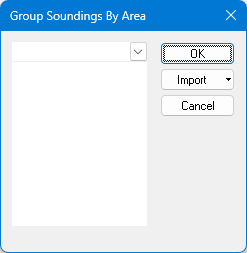
Select the area feature code(s) | Select the area feature code(s) using one of the following methods: • Type in the box. Any area feature code that starts with the letters you type will be displayed. • Click the down-arrow and select from the list of area feature codes. • Click Import and select from the menu: • From Clipboard: The contents of the clipboard are copied to the list. For this to work correctly, the clipboard must contain one or more area feature codes, one to a row. • From Selection: The selected area feature code is added to the list. • From Superselection: The selected area feature code is added to the list. |
Procedure: Selection
1. Select the soundings that you want to group.
2. Select the Group Soundings By Area command.
The Group Soundings By Area dialog box is displayed.
3. Type, select or import the area feature code(s).
4. Click OK.
Grouped soundings are created within the defined area(s). The boundary of each area will be used for the defined area(s).
The defined areas must not overlap. If overlapping areas are found, a message appears in the output window and no soundings are grouped.