 CARIS HPD Source Editor
 CARIS HPD Source Editor
Menu | Tools > Report > Changes since last Verified > Selection Tools > Report > Changes since last Verified > Superselection |
List the changes that were made to selected features since they were last set to Verified.
Procedure
1. Select one or more features.
In this example, the following features are selected:
• A newly digitized underwater rock (UWTROC).
• A light (LIGHTS) that had its colour attribute changed from red to amber.
• A sounding (SOUNDG) that has been moved.
• A depth contour (DEPCNT) that had its depth value changed to 2 metres.
• A depth contour (DEPCNT) that had its shape changed.
2. Select the Changes Since Last Verified Version command.
The following message is displayed in the Output window.
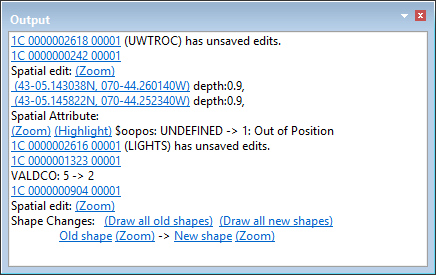
Note that each change is listed along with the associated project. The certification status of the new or modified features is changed to Under Construction.
Clicking on the various links will superselect the appropriate feature, zoom in, or display the old and new versions, as appropriate.
Edits that change the shape of a feature can be viewed by clicking links in the Output window. Click Draw all old shapes to see the old shape in red. Click Draw all new shapes to see the new shape in blue. The image on the right shows both old and new shapes.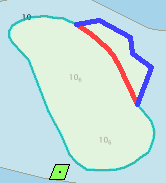
3. Change the status of the UWTROC feature to Verified and save it.
4. Select the Changes Since Last Verified Version command again.
The following message is displayed in the Output window.
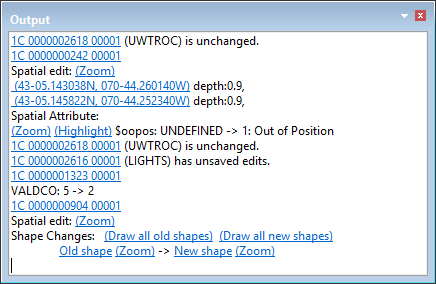
Since the UWTROC feature was Verified and no other changes made, it is no longer listed as new. All changes to the other features are still listed.
5. Verify all other features.
6. Select the Changes Since Last Verified Version command again.
The following messages are displayed in the Output window.
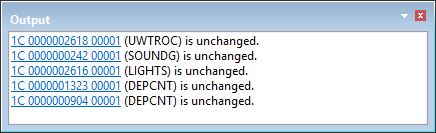
All features are now listed as unchanged once the certification status is set Verified.