Menu | Select > Features By > Attribute Value |
Tool |
|
Menu | Select > Features By > Attribute Value |
Tool |
|
Select features based on their attribute values. All features in the active (selected) layer that meet user-specified filter criteria based on attribute values are added to the Selection window.
The dialog box provided for this command differs based on the format of the active data source.
• For Shapefile, GeoPackage, MapInfo, SQLite and GeoPackage data, as well as database connection layers, the Select by Filter dialog box is used. Details about this dialog box can be found in Filter.
• For HOB, S-57 and V-PF data, the Select by Attribute Value dialog box is used. This tool is described below.
Related commands:
Interface
The Select by Attribute Value dialog box contains the following fields.
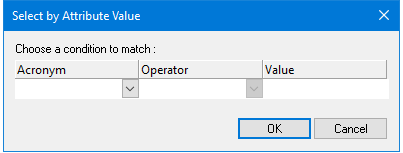
Option | Description |
|---|---|
Acronym | The acronym of the attribute to use for the filter criteria. The list is populated with all attributes found in all features present in the active layer. Select an attribute from the list. |
Operator | The operator to user in the filter. Available operators depend on the selected attribute acronym. Select an operator from the list. |
Value | The attribute value to use for the filter criteria. The type of value depends on the selected attribute acronym. Type a value or select a value from the list as required. Depth and height values are displayed according to the precision settings using the Options command. |
Procedure
1. Select a layer.
2. Select the Select by Attribute Value command.
Depending on the format of the source data, either the Select by Attribute Value dialog box is displayed or the Select by Filter dialog box is displayed.
3. Select an attribute, operator, and value for the selection filter.
4. Click OK.
Features that meet the search criteria are selected.
