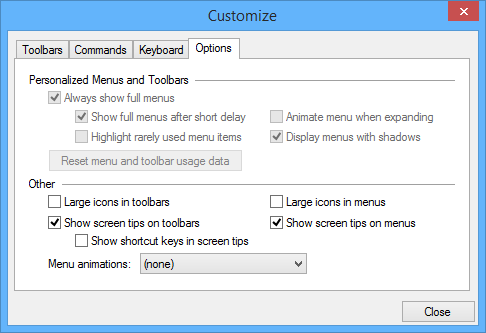
The Options tab of the Customize dialog box controls the way tools are displayed in the toolbars.
The Personalized Menus and Toolbars options are not available in Teledyne Geospatial CARIS application applications. |
Option | Description |
|---|---|
Large icons in toolbars | On: Toolbar icons are 32 x 32 pixels. Off: Toolbar icons are 16 x 16 pixels. |
Show screen tips on toolbars | On: A pop-up label is displayed when the cursor hovers over a tool on the toolbar. Show shortcut in screen tips becomes active. • On: The shortcut key is displayed in the screen tip. • Off: No shortcut key is displayed in the screen tip. Off: No screen tips are displayed. |
Large icons in menus | On: Icons in the menu are 32 x 32 pixels. Off: Icons in the menu are 16 x 16 pixels. |
Show screen tips on menus | On: A pop-up label is displayed when the cursor hovers over a menu item. Off: No screen tips are displayed. |
Menu animations | How menu items behave when you select them. Choose from the list. |
Procedure
1. Set any necessary options.