The Hydrographic Object Binary (HOB) file stores feature objects and associated attribute data.
Option | Description |
|---|---|
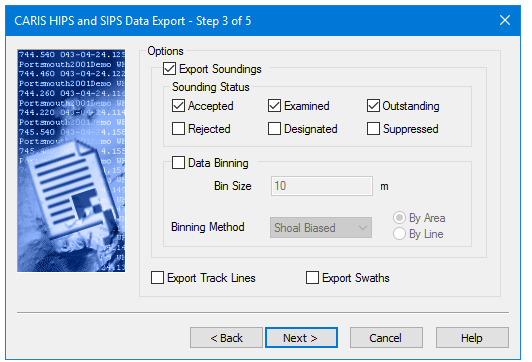
Export Soundings | Defines which soundings are exported using the Sounding Status and Data Binning settings. |
Sounding Status | Selecting any of the status flag check boxes determines which will be included in the export. |
Data Binning | Divides the survey area into a grid and selects either the shoal- or deep-biased soundings from each cell for export. |
Bin Size | Sets the size of the grid cells. |
Binning Method | Select either Shoal Biased or Deep Biased to export only the shoalest or deepest soundings, respectively. • Select the By Area option to export one sounding per bin. • Select the By Line option to process each line, and export a sounding for each line per bin. Where line data overlaps this method can give multiple soundings per bin. |
Export Track Lines | Connects a line along the centre of each swath, thus showing the track of the vessel along each survey line. It is not necessary to export soundings to use this option. |
Export Swaths | Connects a set of lines (one per swath) along outermost port and starboard beams, thus showing the coverage of each ping. It is not necessary to export soundings to use this option. |
These options for export to HOB are set in this dialog box:
Procedure
1. Select the Export Soundings check box to export soundings to a HOB file.
2. Select any of the Sounding Status check boxes, to include soundings with that specific status flag in the export.
3. Select the Data Binning check box.
4. Type the size for the grid cell in the Bin Size field, set in the default units of measure.
5. In the Binning Method field, select either Shoal Biased or Deep Biased and set whether to export the entire survey area or line by line.
6. Select either the Export Track Lines or Export Swaths option.
7. Click Next to go to the next page, HIPS to HOB: HOB Options.