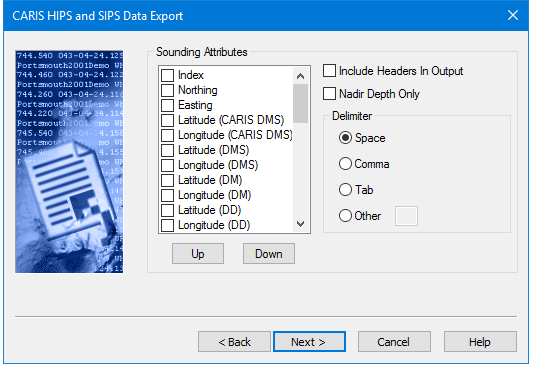
The HIPS to ASCII function creates a customized text listing of soundings that you can load into other software systems. If you select an attribute type (such as Depth) that has values expressed in units of measure, these units must be set in the Select Units dialog box which is displayed automatically when you click Next.
The following dialog box lists the attributes that can be exported to the ASCII file and the delimiters that can be used to separate data in the output file.
Procedure
1. To change the order that attributes are exported, select the attribute in the list and click Up or Down.
2. Select the Include Headers in Output check box to print attribute names at the top of the attribute rows.
3. Select the Nadir Depth Only check box to export just the depth value at nadir.
4. Select either the Space, Comma, or Tab check boxes to use these characters as delimiters, or select the Other check box and type a character to use as a delimiter.
5. Click Next to go to the next page, Select Units.