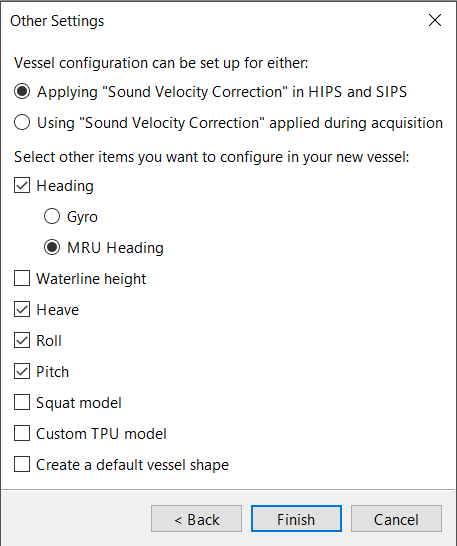
The Other Settings page lets you set miscellaneous settings for the vessel.
To set the other settings:
1. Select whether to apply sound velocity correction (SVC) in HIPS and SIPS or use the SVC that was applied during data acquisition.
This setting cannot be changed after the vessel file is created. It does not appear in this page if the transducer does not use it.
2. Select the vessel components:
• Heading: A sensor that detects the vessel’s heading. Select Gyro if the sensor is separate from the MRU (see Gyro) or MRU Heading if the sensor is part of the MRU (see Heading). The distinction between Gyro and MRU Heading is only used for visualization in the Vessels window, so it has no specific effect in the vessel file.
• Waterline Height: A measurement of the typical waterline on the vessel (see Waterline Height).
• Heave: A sensor that measures the vertical motion of the vessel, typically part of the MRU (see Heave).
• Roll: A sensor that measures the rotation of the vessel around its Y axis (see Roll).
• Pitch: A sensor that measures the rotation of the vessel around its X axis (see Pitch).
• Squat Model: A model that describes how the speed of the vessel affects how deeply it sits in the water (see Squat Model).
• Custom TPU Model: A model used to calculate the total propagated uncertainty (TPU) of each sounding taken by the instrument (see TPU Values).
You can change which components are available for editing after you create the vessel file (see Configure Components).
3. Create a Default Vessel Shape: Creates a default vessel shape with sample values when you finish this wizard.
You can also create the vessel shape (or edit the default shape) after you create the vessel file (see Create Vessel Shape Outline).
4. Click Finish.
The wizard closes and the new vessel file appears in Vessel Editor.
5. Select the Save command to save the vessel to a suitable location.
Menu | File > Save |
Tool |
|
The vessel file has now been created and saved.
Before you can use it for processing in HIPS and SIPS, you must configure the components (see Configure Components). Optionally, you can also create or edit the vessel shape outline (see Create Vessel Shape Outline).
