You can use the SVP Editor to modify existing speed/depth values, append new data to an existing file, delete data or delete a complete profile.
Edit speed or depth values
Individual values in the depth/speed table can be changed. To change depth/speed values:
1. Select a profile in the Profiles table to display the data in the SVP Editor.
The Profile Data fields will be updated to show the data for the selected profile.
2. Click on a Depth or Speed cell in the Profile Data table to select the value.
3. Type a new value.
4. Click outside the cell.
The cell displays the new value.
Add new values
To add depth and speed values together:
1. Select an existing profile in the Profiles table.
There are two options for typing values when entering speed and depth data together:
• separate the depth and speed values with a space, for example: 15 1200
• separate the data with a comma: 15,1200
Depth values must be greater than 0m. Speed values must be between 1400.0 and 2000.00.
2. Type new depth and speed values in the text box beside the Add button.
3. Click Add or press Enter.
Edit positions
Enter new latitude and longitude positions for SVP data. This information is important if you want to use the Nearest in Distance option for sound velocity correction.
To edit geographic coordinates:
1. Select a profile by a time stamp.
2. Select the Edit Profile command.
Menu | Edit > Edit Profile |
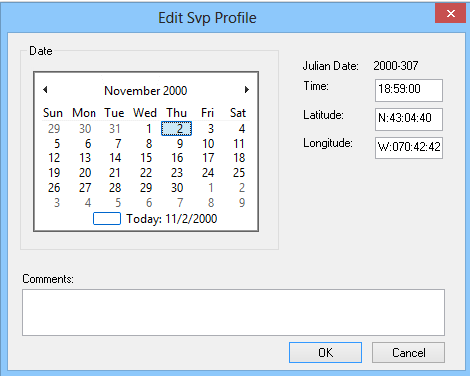
The Edit Profile dialog box is displayed, and the calendar box shows the day month and year of the selected profile.
3. Click in the Latitude coordinates field and type new coordinates.
4. Click in the Longitude field and type new coordinate.
5. Click OK.
The new geographic coordinates are displayed in the Latitude and Longitude sections of the Profiles area.
Delete data
To delete speed/depth data:
1. Dr dragging the cursor over the data points in the graphical display, or
2. click a row number in the table.
The selected data is highlighted.
3. Select the Delete command.
Menu | Edit > Delete |
Key | <Delete> |
The Speed/Depth data points are removed from the graphical display and the values are no longer displayed in the table.
Remove Profile
To remove a currently open profile from the SVP file:
1. Select a profile by clicking the time stamp in the Profiles list.
The depth/speed values are displayed in the editor.
2. Select the Remove Profile command.
Menu | Edit > Remove Profile |
Key | < |
The profile is removed.