.
Since Sound Velocity Profile files are in text format they can be opened in a text editor as well as in SVP Editor. These files can contain more than one section.
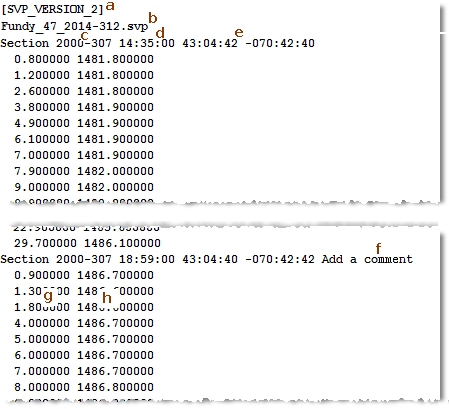
The following is an extract from a sample SVP file:
.
The first line of the file specifies the version of the SVP file (line “a” in the example above).
The second line displays the name of the SVP file (“b”).
The next line is a section heading for each profile, containing:
• the year and day (Julian date) that the profile was recorded (“c”)
• time stamp when the profile was recorded (“d”)
• the latitude and longitude of the profile location (“e”).
• the text of a comment added to the profile using the Edit Profile function (“f”).
• the SVP data displayed in two columns, one column (“g”) containing the depth, and the other(“h”), the speed value for that depth.