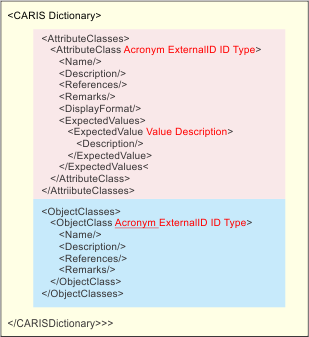
Dictionaries define what features and attributes are in hydrographic products. For example, a dictionary for S-57 defines the features and attributes that are available in an S-57 chart.
Custom dictionaries can be built but these must use the same structure and syntax as existing dictionaries. More than one dictionary can be used for a product.
The structure of the a dictionary file is shown below. Attributes are shown in red.
The file is divided into two sections: attribute classes and object classes.
The file must include the following header:
<?xml version="1.0" encoding="UTF-8" standalone="no"?> <CARISDictionary Version="1"> |
This table describes tags and associated attributes.
Tags | Description |
|---|---|
<CARISDictionary> | The root tag for all elements in this file. Attributes:
Example: <CARISDictionary Version="1"> |
<AttributeClasses> | Parent tag for all elements within the attribute section of the dictionary. |
<AttributeClass> | Parent tag for individual attributes. Attributes:
Example: <AttributeClass Acronym="BUISHP" ExternalID="3" ID="3" Type="ENUMERATION"> |
<Name> | Full name of the attribute, e.g., “building shape” for BUISHP attribute. Example: <Name>Building shape</Name> |
<Description> | Full explanation of the attribute. This tag is empty if the attribute is a enumeration or list type. Example: <Description>The depth below the sea bed to which an object is buried.</Description> |
<References> | Source document for attribute information. Example: <References>The New Shorter Oxford English Dictionary, 1993</References> |
<Remarks> | Additional information about an attribute. Example: <Remarks>The attribute 'shape of building' encodes the various profile shapes of buildings.</Remarks> |
<ExpectedValues> | Parent tag for values in an enumeration or list type attribute. |
<ExpectedValue> | Child tags of <ExpectedValues>. This tag contains values in an enumeration or list type attribute. Attributes:
Example: <ExpectedValue Description="{spire}" Value="3"/> |
<Description> | Full explanation of the attribute. This tag is empty if the attribute is a enumeration or list type. Example: <Description>The depth below the sea bed to which an object is buried.</Description> |
<DisplayFormat> | The format of float or integer type attributes. Example: <DisplayFormat>###.#</DisplayFormat> |
<ObjectClasses> | Parent tag for all individual object class tags. |
<ObjectClass> | Parent tag for individual features. Attributes:
Example: <ObjectClass Acronym="AIRARE" ExternalID="2" ID="2" Type="GEOGRAPHIC"> |
<Name> | Brief textual description of the feature. Example: <Name>Airport/airfield</Name> |
<Description> | Full description of the feature. Example: <Description>An area containing at least one runway, used for landing, take-off, and movement of aircraft.</Description> |
<References> | Source material for information on feature. Example: <References>INT 1: ID 17; M-4: 366;</References> |
<Remarks> | Additional information about the feature. Example: <Remarks>Distinction: runway; sea-plane landing area; </Remarks> |