The data types are listed on the left side of the interface.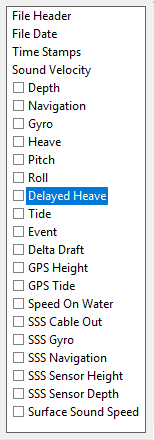
The data types are listed on the left side of the interface.
If the check box beside a data type is selected, then that data is present in the raw data file, and available for conversion. Each data type has a set of parameters that are displayed when it is selected. These parameters determine what parts of the text file are parsed for the configuration file.
To view the parameters:
1. Select a data type so it is highlighted.
The parameters for the highlighted data type are displayed in the Parser. The example below shows the fields for gyro data parameters. 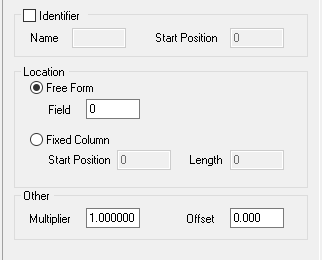
2. Enter data as needed.
When the text file is parsed, the data types that are checked will be included in the conversion. If you do not want to include a type of data in the conversion, clear the check box.
Clear Sensor
1. To remove changed parameters from a data item, select the Reset Selected Sensor command.
Menu | Edit > Reset Selected Sensor |
The parameters are reset to the default positions.
You must complete all the fields in each section before selecting another data type. |