Menu | Create > Areas > From Minimum Bounding Rectangle |
Tools |
|
Menu | Create > Areas > From Minimum Bounding Rectangle |
Tools |
|
Create a new rectangular area that fits the extent of selected features. Any combination of feature types can be selected.
This command is useful for creating meta-objects that overlay other features. Meta-objects cover areas where features share a common attribute value, such as quality of data.
Related commands:
Procedure
1. Select one or more features.
2. Select the Create Area From Minimum Bounding Rectangle command.
3. Select an acronym and set any necessary attributes as described in Create.
A rectangular area is created around the selected features. You might have to refresh the screen to see the new area.
Example
In this example, three features are selected and a rectangular area is created.
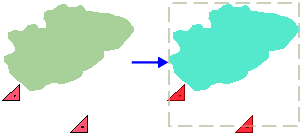
Note that actual location of a point feature is considered, not the physical appearance.
